


Claude and Obsidian: How to Connect Them (and Make It a Second Brain)
The four ways to give Claude your Obsidian vault, which one to pick, and the one file that turns a folder of notes into a second brain.


Contents
The bit to remember
- An Obsidian vault is a plain folder of markdown files, so the simplest way to connect Claude is to give it that folder, and you don’t need a plugin to do it.
- Claude can reach your vault four ways: the Claude desktop app, Claude Code, a community MCP server, or the official Obsidian CLI.
- An MCP server only earns its setup time if you need Obsidian’s live features, like backlinks or the active note.
- A short house-rules file (CLAUDE.md or AGENTS.md) at the vault root is what turns a folder of notes into a second brain.
- Since August 2025, Claude Free, Pro and Max users choose whether chats train models, so check that setting before you point Claude at private notes.
Summarize with AI
I run my consultancy out of an Obsidian vault that Claude reads every day: client files, playbooks, brand rules and the skills that write this kind of article.
Below are the four ways to connect Claude to Obsidian, which one to pick, and the file that does most of the work once you’re connected.
How do you connect Claude to Obsidian?
You connect Claude to Obsidian by giving Claude access to your vault folder, either in the Claude desktop app or by running Claude Code inside it. Obsidian stores every note as a plain markdown file in a folder on your computer, so anything that can read files can read your vault.
You don’t need an Obsidian plugin for Claude to read, search and edit your notes. Plugins and MCP servers add extras on top, and they’re worth it for some people, but they aren’t the connection itself.
Claude in a web browser can’t see files on your computer, though, so you need the desktop app or Claude Code, and both need a paid plan. Claude Code is included with Pro and Max, not the Free plan, and Pro was $20 a month billed monthly when I checked in October 2026.
The four ways to connect, compared
| Method | What you need | Obsidian must be open? | Best for | Watch out for |
|---|---|---|---|---|
| Claude desktop app (Cowork) | Desktop app, paid plan | No | Non-coders who want point-and-click | Pick the vault root, not a subfolder |
| Claude Code in the vault | Claude Code, a terminal or the app’s Code tab | No | Daily work, slash commands, skills | Approve edits until you trust it |
| Obsidian MCP server | A community plugin or server, an API key | Yes, for plugin-based servers | Live Obsidian data: active note, backlinks, commands | Some plugins get archived; old tutorials point to dead ones |
| Obsidian CLI | Obsidian 1.12 installer, Claude Code | Yes, it launches if closed | Daily notes, tasks, templates, search through Obsidian itself | Newer, so fewer guides exist |
If you’re not sure, start with the first or second option. I use both every day, and I don’t run an MCP server for my own vault.
Option 1: Point the Claude desktop app at your vault
If you’d rather skip the terminal, use Cowork in the Claude desktop app. It works from a folder on your computer, and Anthropic’s help center says it needs the latest desktop app and a paid plan.
- Find your vault’s folder: In Obsidian, right-click any note and choose the option to show it in your system’s file explorer.
- Update the app: Open the Claude desktop app and update it if it asks.
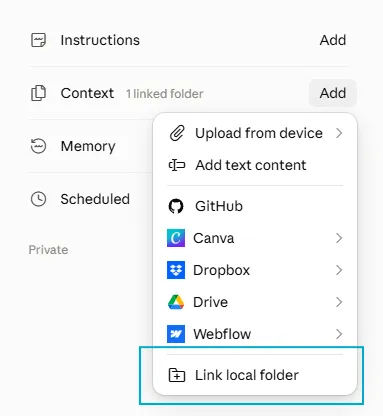
- Link the folder: Open a project, or create one. In the project sidebar, find Context, click Add and choose Link local folder.
- Pick the root: Select the vault’s root folder (the one that contains the hidden .obsidian folder). Context then shows it as a linked folder.
- Test it: Ask something your notes can answer, like “What have I written about pricing?”
Option 2: Run Claude Code inside the vault
Claude Code is the option I’d pick if you plan to build repeatable workflows, because it supports slash commands, skills and project instructions. You can use it from the desktop app’s Code tab or a terminal.
- Install Claude Code: Anthropic’s setup docs give one-line installers:
curl -fsSL https://claude.ai/install.sh | bashon macOS and Linux, orirm https://claude.ai/install.ps1 | iexin Windows PowerShell. - Open the vault: Open a terminal in your vault’s root folder, or open that folder from the Code tab.
- Sign in: Run
claudeand sign in. - Start read-only: Ask, “List the top-level folders and tell me what each one holds.”
By default, Claude Code asks before it edits a file or runs a shell command, while reading files in the working folder needs no approval. I’d leave it that way for your first few sessions. Watching what it wants to change is the fastest way to learn whether your notes are organized the way you think they are.
Option 3: Use an Obsidian MCP server
MCP (Model Context Protocol) lets Claude call tools that another program exposes. For Obsidian, that program is usually a community plugin running inside the app, which means Claude can work with things a plain folder doesn’t show: the note you have open, Obsidian commands, and edits targeted at a specific heading or frontmatter field.
Obsidian doesn’t ship an official MCP server. The options come from the community, and the two most cited are:
- Local REST API with MCP: an Obsidian plugin that exposes a local REST API and an MCP server at https://127.0.0.1:27124/mcp/, served over HTTPS and gated behind an API key.
- mcp-obsidian: a Python server that talks to that plugin. Its README lists tools for listing files, searching, appending, patching under a heading, and deleting.
The mcp-obsidian config for Claude Desktop looks like this:
{
  "mcpServers": {
    "mcp-obsidian": {
      "command": "uvx",
      "args": ["mcp-obsidian"],
      "env": {
        "OBSIDIAN_API_KEY": "<your_api_key_here>",
        "OBSIDIAN_HOST": "<your_obsidian_host>",
        "OBSIDIAN_PORT": "<your_obsidian_port>"
      }
    }
  }
}
It needs Python 3.11 or newer, and the README warns that it crashes with version 2.0 of the mcp Python package, so install the pinned version it ships with.
Check that a plugin still exists before you follow an MCP tutorial. The once-popular MCP Tools plugin for Claude Desktop now shows “This plugin has been archived and is no longer available” in Obsidian’s plugin directory, and plenty of 2025 videos still walk you through installing it.
An MCP server is worth the setup if you want Claude to act on whatever note you’re looking at, or to run Obsidian commands. If you mostly want Claude to read, search and write notes, it adds a moving part that folder access already covers.
Option 4: Use the Obsidian CLI and Obsidian’s own skills
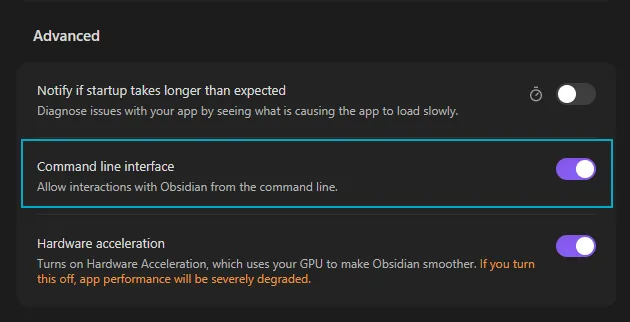
The Obsidian CLI is Obsidian’s official command line, which lets scripts and agents control the app from a terminal. It requires the Obsidian 1.12 installer. You turn it on in Settings > General > Command line interface, and the app needs to be running (the first command launches it if it isn’t).
A few commands from Obsidian’s help page:
obsidian daily
obsidian daily:append content="- [ ] Send the Q4 audit"
obsidian search query="meeting notes"
obsidian create name="Client kickoff" template=Kickoff
Obsidian’s CEO, Steph Ango (kepano), also publishes obsidian-skills, a set of agent skills that teach Claude Code, Codex and other agents to use the CLI and Obsidian’s own formats: Obsidian-flavored markdown with wikilinks and callouts, Bases, and JSON Canvas. In Claude Code you can install them with two commands:
/plugin marketplace add kepano/obsidian-skills
/plugin install obsidian@obsidian-skills
I’d add the skills before anything else on this list, because without them Claude tends to write generic markdown, and Obsidian’s callouts, embeds and properties have their own syntax.
The house-rules file is what makes it a second brain
Once Claude can see your vault, the next problem shows up fast: every session starts from zero, and Claude wanders. It reads random notes, guesses which folder means what, and saves things in the wrong place. A connected vault is still just a folder until you tell Claude how it works.
A house-rules file at the vault root fixes that. Claude Code reads CLAUDE.md at the start of every session, and it reads AGENTS.md instead when no CLAUDE.md exists. Anthropic suggests keeping each file under 200 lines, and a CLAUDE.md can pull in other files with an @path import.
Copy this starter and edit it to match your folders:
# House rules for this vault

## Start every session by
1. Reading index.md (the table of contents).
2. Reading hot.md (what's active this week).
3. Reading the folder notes for whatever I ask about.

## How this vault is organized
- index.md: one line per area or project. Read first.
- hot.md: current focus, deadlines, open questions. Read second.
- projects/<name>/: one folder per project, everything about it.
- reference/: playbooks, checklists, how I do things.
- inbox/: unsorted captures. File them when asked.

## Conventions
- Plain markdown. Small, single-topic notes.
- Filenames: lowercase-with-dashes.
- Link related notes with [[wikilinks]].
- When you learn something durable, write it to the right note.
- Never delete a note. Move it to _archive/ and tell me.
- Finished deliverables live outside the vault. Store a link, not the file.
The archive rule means a bad session costs you a few minutes, not your notes. The “write durable things down” rule is how the vault gets smarter, because next week’s session reads what this week’s session learned.
How my own vault is set up
My vault, which I call the brain, is the working memory for Chateau Mojo. It holds more than 500 markdown notes, 22 Claude skills and a folder for every active client, and Claude reads it through both the desktop app and Claude Code. I haven’t installed a single Obsidian community plugin.
brain/
├─ CLAUDE.md          # one line: @AGENTS.md
├─ AGENTS.md          # house rules, read by Claude and Codex
├─ index.md           # table of contents, one line per client and area
├─ hot.md             # what's active right now
├─ clients/
│  ├─ registry.yaml   # maps a client name to a folder and a read order
│  └─ <client>/       # AGENTS.md, brand voice, meetings, reference
├─ agency/            # principles, brand voice, content standards, tools
├─ skills/            # Claude skills, including the blog writer
└─ templates/         # a blank client folder to copy
Five setup choices did most of the work:
- One rules file for two AIs: my CLAUDE.md is a single line that imports AGENTS.md. Codex reads AGENTS.md natively, so Claude and Codex follow the same house rules without me keeping two copies in sync.
- A session-start contract: AGENTS.md tells Claude to read index.md, then hot.md, then resolve the client in registry.yaml before touching any client work. If it can’t reach those files, it has to stop and say so instead of answering from memory of an old chat.
- No guessing: the registry maps every client name, nickname and domain to one folder, so Claude never has to guess which client I mean.
- Deliverables live elsewhere: finished drafts go to Google Drive. The vault keeps a pointer, so it stays small enough for Claude to read quickly.
- Git underneath: the vault is a git repository, so every change Claude makes can be reviewed or undone, and the API keys file is in .gitignore.
When I ask for a blog draft, Claude loads the brand voice, the SEO principles and the content standards before writing a word, so I never paste the same context into a fresh chat. I wrote up the whole system in my guide to the AI second brain I run my consultancy on, and how I use it for content, ads, email and reporting in Claude for marketing.
What to keep out of a vault Claude can read
When Claude reads a note to answer you, that note’s text goes to Anthropic. Since Anthropic’s August 2025 terms update, Free, Pro and Max users (including Claude Code on those accounts) choose whether their chats help train models. If you allow it, data is kept for five years. If you don’t, it’s 30 days. Team, Enterprise and API use fall outside that change.
If you’ve read that paid accounts are never used for training, that stopped being a safe assumption after this update. Check your privacy setting before you connect a vault that holds anything sensitive.
Three rules keep a connected vault safe:
- Secrets elsewhere: Keep passwords, API keys and account numbers in a password manager or an ignored
.envfile, never in a note. - Other people’s private details: Put anything about other people that they wouldn’t want shared (health, HR, legal) in a separate vault Claude can’t reach.
- Client contracts: If you work with clients, check whether your contract allows their material in an AI tool.
A first-session prompt to copy
Once you’re connected, this prompt gets you a working structure in one sitting:
Read every note in this vault. Don't change anything yet.
Then propose:
1. An index.md with one line per top-level area.
2. An AGENTS.md with house rules for how you should work here,
   under 100 lines, based on how my notes are actually organized.
3. A list of notes that look duplicated, orphaned or out of date.
Wait for my approval before writing any file.
Keep the “don’t change anything yet” line, because Claude is happy to reorganize a vault, and reviewing a plan beats reviewing 300 moved files.
What a second brain has to do with AI visibility
A second brain that knows your clients, your rules and your voice is the same idea that makes a brand visible in AI search: clear, structured, plain-text knowledge that a machine can read and trust. The llms.txt explainer covers the website version of that idea, and if you want help making your expertise readable to Google and to AI answers, that’s what my AI search optimization work does. For the classic search side, start with SEO consulting.
FAQ
Does Obsidian have an MCP server?
Not an official one. Obsidian’s own tool for outside programs is the Obsidian CLI, and MCP servers come from community plugins such as Local REST API with MCP, which serves MCP on your own machine behind an API key.
Can Obsidian be used with Claude Code?
Yes. Open your vault folder in Claude Code and it can read, search and edit your notes directly, with no plugin. You can add an MCP server or Obsidian’s skills later for extras.
Do I need a paid Claude plan to connect Obsidian?
Yes. Claude Code is included with Pro and Max but not Free, and Cowork’s folder access needs a paid plan and the desktop app. Claude in a browser can’t read files on your computer.
Is Obsidian free?
Yes. Obsidian is free, including for work, and a commercial license is optional. Sync ($4 a month billed annually) and Publish ($8 a month billed annually) are paid add-ons, and you don’t need either to connect Claude.
Will Claude change my notes without asking?
Not in Claude Code’s default mode, which asks before every file edit and shell command. Faster modes exist, so keep the default until you trust your setup, and use git or an archive folder as a safety net.
Does Obsidian work well with Git?
Yes, because a vault is just a folder of text files. Putting it under git gives you a full history of every change, which is especially useful once an AI is editing notes.
What’s the best way to build an Obsidian second brain with Claude?
Connect the vault folder, add a short house-rules file at the root, and keep an index note and a “what’s active now” note for Claude to read first. Structure does more than plugins.