


Bing Webmaster Tools in 2026: The Setup That Feeds Copilot (and Part of ChatGPT)
How to set up Bing Webmaster Tools, what the AI Performance report can and can’t tell you, and how much of this actually reaches ChatGPT.


Contents
Read this if your coffee is getting cold
- Bing Webmaster Tools is Microsoft’s free version of Google Search Console, and since February 2026 it also shows how often Microsoft Copilot cites your pages and which search phrases led to those citations.
- If your site is already in Google Search Console, the import option adds and verifies it in Bing Webmaster Tools in a few clicks, sitemaps included.
- IndexNow tells Bing, Yandex, Naver, Seznam, Yep, the Internet Archive and Amazonbot about changed URLs right away, but Google is not on that list.
- Microsoft says its Web IQ grounding service, built on the Bing index, powers ChatGPT, while OpenAI also runs its own index, so Bing is one of several doors into ChatGPT, not the only one.
- The AI Performance report counts citations, not clicks, and Microsoft calls its numbers a sample, so use it for trends and topic gaps, not for revenue reporting.
Summarize with AI
For about a decade, Bing Webmaster Tools was the gym membership of SEO tools: everyone signed up, almost nobody went. That changed in 2026. Microsoft added a report that shows which of your pages Copilot cites as sources, and Google searches for “bing webmaster tools” in the US went from 12,100 a month in late 2025 to 27,100 a month this summer.
This guide walks through the setup step by step, explains what the AI Performance report can and can’t tell you, and sorts out the question everyone asks next: does being in Bing actually get you into ChatGPT?
What is Bing Webmaster Tools?
Bing Webmaster Tools is a free Microsoft service that shows how Bing crawls, indexes and ranks your website, and how often Microsoft’s AI experiences cite your pages. It’s the Bing equivalent of Google Search Console, and many people search for it as “Bing Search Console”.
It covers the usual search basics: search performance (clicks, impressions, queries) with 16 months of history, sitemaps, URL inspection, URL submission, backlinks, keyword research and site scans. The part that makes it worth your time in 2026 is AI Performance, which reports citations across Microsoft Copilot, AI-generated summaries in Bing and what Microsoft calls “select partner integrations”.
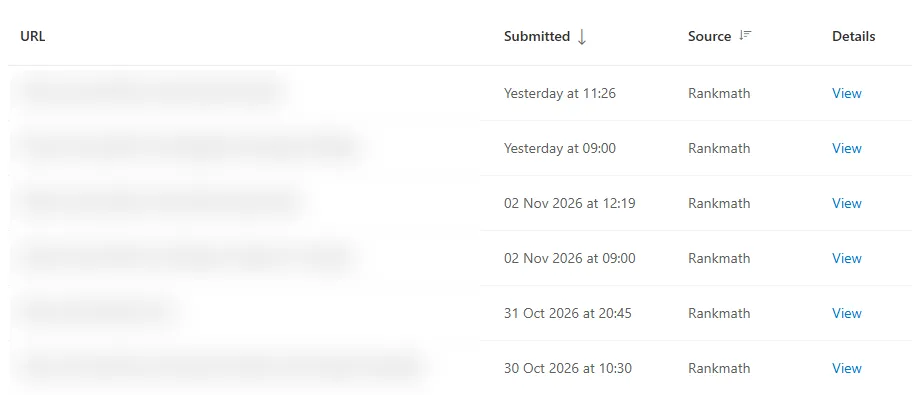
I keep Bing Webmaster Tools connected on my clients’ sites. Most of the time it runs in the background, because Rank Math pings IndexNow whenever a page is published or updated, so I mostly open the dashboard for the AI Performance report.
Does ChatGPT use Bing’s index?
Partly. The real answer has more moving parts than the “ChatGPT runs on Bing” line still going around LinkedIn, and this is what OpenAI, Microsoft and one independent investigation say on the record as of November 2026.
| Source | What it says | What it means for you |
|---|---|---|
| OpenAI’s help article on ChatGPT search | ChatGPT search “sometimes partners with other search providers” and links to Microsoft’s privacy statement. To be eligible, a site has to allow OAI-SearchBot. | OpenAI doesn’t name Bing for consumer ChatGPT, and its own crawler decides eligibility. |
| OpenAI’s Enterprise and Edu search article | ChatGPT “may share disassociated search queries with the Bing search engine” for those workspaces. ChatGPT for Healthcare workspaces don’t use Bing. | Bing is named directly for business plans. |
| Microsoft’s Web IQ page | Web IQ, a grounding API built on the Bing index and launched in June 2026, “powers leading frontier AI assistants, including Microsoft Copilot and ChatGPT.” | Microsoft confirms its index feeds ChatGPT through Web IQ. |
| Peec AI’s September 2026 investigation | ChatGPT runs its own family of indexes, internally called Labrador, plus Google-scraping providers, with Bing showing up mainly in Deep Research. | Bing is one supplier among several, and OpenAI is building its own. |
So the Bing index reaches ChatGPT through Microsoft’s Web IQ and through Bing search for business plans, but ChatGPT also uses its own crawler and index and other providers. Being indexed in Bing helps ChatGPT find you. It doesn’t decide whether ChatGPT cites you.
I dug into the citation side in How to Rank in ChatGPT, where research on 468,037 citations found ChatGPT’s rewritten searches rarely match Google’s or Bing’s own results. So treat Bing Webmaster Tools as cheap insurance for ChatGPT and as the main control panel for Copilot.
How to set up Bing Webmaster Tools, step by step
The whole setup takes about 15 minutes if your site is already in Google Search Console, and maybe 30 if you verify by hand.
- Sign in: Go to Bing Webmaster Tools and sign in with a Microsoft, Google or Facebook account. The account is free.
- Import from Google Search Console, or add the site manually: The import option asks for permission to read your Search Console account, lists your verified properties with their sitemaps, and adds and verifies the ones you pick. You can import up to 100 sites at a time, and an account can hold up to 1,000. Bing rechecks ownership through Search Console periodically and pulls in any new sitemaps it finds there, so your sitemap list stays current without extra work.
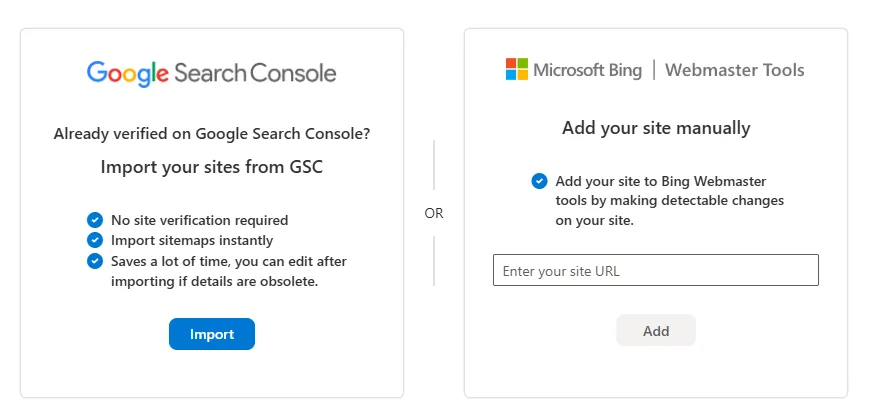
The import option on the left skips verification entirely if your site is already in Google Search Console. - Verify ownership if you added the site manually: Pick one of the four methods in the table below. DNS is the sturdiest because it survives redesigns and CMS changes.
Method What you do Best for DNS auto verification Sign in to your DNS provider when prompted; Bing adds the record through the Domain Connect standard Domains at a provider that supports Domain Connect XML file Download BingSiteAuth.xml and upload it to your site’s root folder Sites where you can upload files to the server Meta tag Paste the <meta name="msvalidate.01">tag into the<head>of your homepageWordPress, Webflow and other CMS sites with a header field CNAME record Add the CNAME record Bing gives you at your domain host Anyone with DNS access whose provider lacks Domain Connect - Submit your sitemap: Go to Sitemaps and add your sitemap URL, usually https://yourdomain.com/sitemap.xml. Bing accepts XML sitemaps and sitemap index files, RSS 2.0, Atom and plain text files with one URL per line. Skip this if the import already brought your sitemaps across.
- Turn on IndexNow: This is the step most setups miss, and it gets its own section below. If you’re on Wix, Duda or GoDaddy’s site builder, it’s already on.
- Check your robots.txt for both bots that matter: Make sure you aren’t blocking Bingbot (Bing and Copilot) or OAI-SearchBot (ChatGPT search). In my study of 388 Canadian websites, 30 of the 372 I could read blocked ChatGPT’s search crawler, most of them news sites. If you block it, no amount of Bing setup gets you into ChatGPT search.
- Wait about 48 hours, then open AI Performance: Microsoft says it usually takes 48 hours to generate data for a new site. Small or new sites may see few or no grounding queries at first, which Microsoft says “does not indicate a penalty or exclusion.”
Allowing is the default, so you only need explicit rules like these if a broader rule in your robots.txt blocks either bot:
User-agent: bingbot
Allow: /

User-agent: OAI-SearchBot
Allow: /
IndexNow: the step most setups skip
IndexNow is a free, open protocol that pings participating search engines the moment a URL is added, updated or deleted, so they don’t have to wait for their next crawl to notice. You send one notification and it’s shared with every engine in the group.
The current participant list is Bing, Yandex, Seznam, Naver, Yep, the Internet Archive and Amazonbot, which is an oddly eclectic guest list. Google isn’t on it, so IndexNow does nothing for Google rankings or AI Overviews. It matters for AI search because Microsoft ties it directly to freshness in AI answers: the AI Performance launch post says IndexNow “helps ensure that AI systems reference the most current version of a page.”
Bing’s IndexNow setup page lists these ways to turn it on, from least to most work:
| Your setup | What to do |
|---|---|
| Wix, Duda, GoDaddy site builder, XenForo | Nothing. It’s built in. |
| WordPress | Turn it on in Yoast, Rank Math or AIOSEO, or install the IndexNow plugin |
| Shopify | Install an IndexNow app such as InstaIndex |
| Behind Cloudflare | Enable Crawler Hints in your Cloudflare dashboard |
| Custom site or headless CMS | Generate a key, host it as a text file, and call the API when content changes |
For a custom build, the API call is short. Host a text file containing your key at your site root, then send changed URLs in one request:
POST https://api.indexnow.org/IndexNow
Content-Type: application/json; charset=utf-8

{
  "host": "www.example.com",
  "key": "your-key-here",
  "keyLocation": "https://www.example.com/your-key-here.txt",
  "urlList": [
    "https://www.example.com/new-page/",
    "https://www.example.com/updated-page/"
  ]
}
A 200 response means the submission was received. A 403 means Bing couldn’t find or match your key file, and a 422 means a URL doesn’t belong to the host you declared.
According to Bing’s FAQ, IndexNow doesn’t guarantee that a page gets crawled or indexed, shouldn’t be used to resubmit old URLs that haven’t changed, and still counts every crawl it triggers against your crawl quota. Use it for real changes only. For one-off pages, the manual URL Submission tool in Bing Webmaster Tools takes up to 10,000 URLs per domain per day.
How to read the AI Performance report
AI Performance launched in public preview in February 2026 and shows when your pages are cited as sources in Copilot, Bing’s AI summaries and select partner experiences. Microsoft added four views in June 2026 and a Topics Portfolio beta in October 2026.
| Metric or view | What it tells you | What it doesn’t |
|---|---|---|
| Total citations | How many times your content was shown as a source in an AI answer | Clicks, traffic or where in the answer you appeared |
| Average cited pages | How many unique pages from your site get cited per day | Which pages matter most to the business |
| Grounding queries | The short search phrases the AI used to retrieve your content | The user’s actual prompt |
| Pages | Citation counts per URL, linked to the queries behind them | Page quality or ranking |
| Intents | Groups grounding queries into types such as Informational, Commercial, Comparison and Local | Perfect labels; Microsoft says classifiers still miss on ambiguous queries |
| Topics | Groups related grounding queries into themes | Exact topic boundaries |
| Citation Share | Your percentage of all citations for one grounding query | Who your competitors are; Microsoft hides other domains |
| Compare | Overlays a previous period on the chart | Why anything changed |
| Topics Portfolio (beta) | Topic size, how many sites get cited in it, and “opportunity queries” where other sites are cited and you aren’t | Exact volumes; opportunity numbers are shown as ranges |
Grounding queries trip people up because they’re what Copilot searched for behind the scenes, so “best crm small business” in the report might have started as a long, rambling question from a user. Microsoft says plainly that the report doesn’t show individual prompts.
Before any of this goes in a client report, know that Microsoft’s help page says the data “represents a sample of overall citation activity,” and that a citation “does not represent traffic, clicks, or user engagement.” And “select partner integrations” isn’t defined anywhere I could find, so don’t assume ChatGPT citations show up in this report.
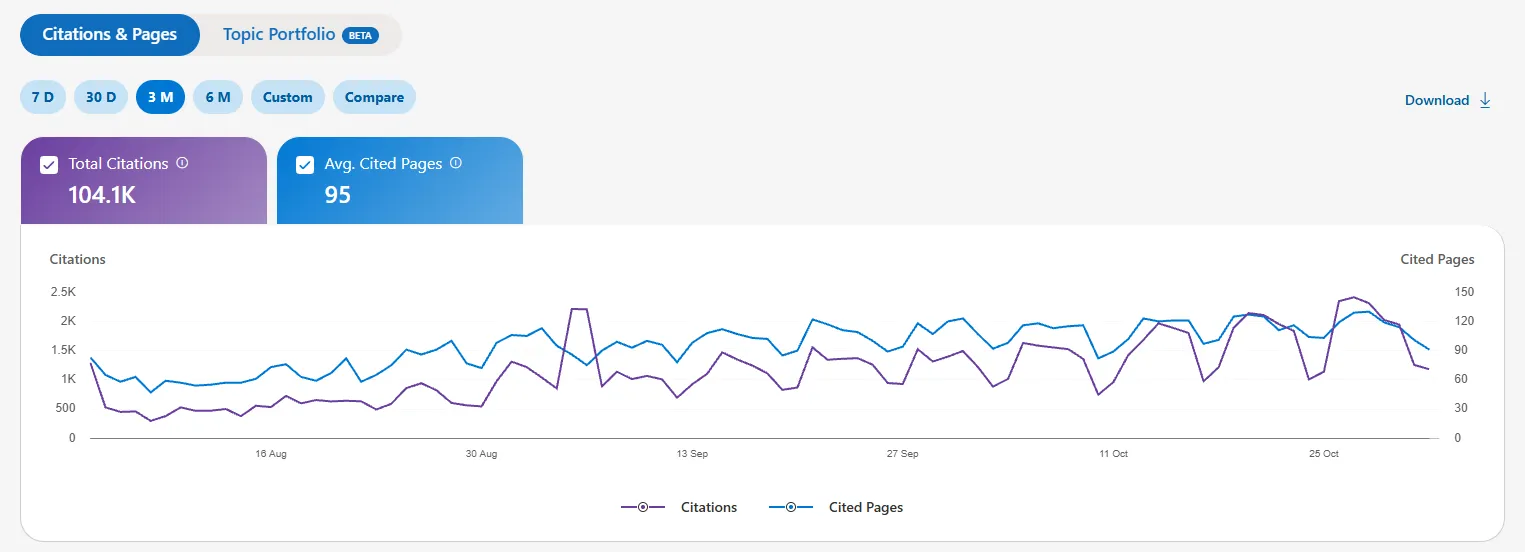
On that client’s account, daily citations went from roughly 500 in mid-August to around 2,000 by late October, while the number of pages cited each day only doubled, from about 60 to about 120. Most of the growth came from the same core pages being cited more often, which is a good argument for improving the pages that already get cited before writing new ones.
A 15-minute monthly routine
After setup, the ongoing work fits in one monthly session.
- Open AI Performance, set the range to 30 days and turn on Compare against the previous 30 days.
- Sort pages by citations. Note any page that dropped sharply and check whether its content is out of date.
- Open Topics Portfolio (if your site has enough data to show it) and read the opportunity queries in your top two topics.
- Export the grounding queries to CSV and run the prompt below.
- Check the IndexNow list to confirm last month’s new and updated pages were sent.
- Glance at Search Performance for Bing clicks on the pages that make you money.
This prompt turns the grounding query export into a short to-do list in Claude or ChatGPT:
I've attached a CSV export of grounding queries and citation counts from the AI Performance report in Bing Webmaster Tools for [your domain], covering [date range]. Grounding queries are the search phrases Microsoft Copilot used to find my pages, not the users' original questions.

1. Group the queries into 5 to 8 themes and give total citations per theme.
2. For each theme, name the page on my site that's most likely being cited, based on these URLs: [paste your key URLs].
3. List queries that suggest a question my site doesn't answer directly yet.
4. Flag any theme that's close to a product or service I sell: [list them].
5. Give me the three page updates most likely to matter for leads, not just citations, and say why in one sentence each.

Don't invent numbers that aren't in the file.
The grounding opt-out deadline coming in 2027
On October 30, 2026, Microsoft announced new publisher preferences that separate AI training from AI grounding, starting February 1, 2027. You can set a page’s grounding preference to Allow (the default), Disallow, or a new middle option called DisallowExtended. That middle option keeps your pages in Microsoft’s own products, such as Copilot, but excludes them from grounding services Microsoft sells to third parties, and Microsoft names Web IQ as one of them.
Since Microsoft also says Web IQ powers ChatGPT, I’d expect DisallowExtended to cut off at least one route your content takes into ChatGPT. Microsoft hasn’t spelled out that consequence, but it follows from its own two pages. For most businesses that want AI visibility, the right move is to do nothing and stay on Allow.
If your site currently uses NoArchive or NoCache tags to keep content out of AI answers, you do need to act. Those tags stop counting for training and grounding after March 1, 2027, and Microsoft asks those sites to publish the new page-level preference and record a temporary one in Bing Webmaster Tools, which opens on December 15, 2026.
Bing Webmaster Tools vs Google Search Console
You need both, and they report on different audiences, so neither replaces the other.
| Feature | Bing Webmaster Tools | Google Search Console |
|---|---|---|
| AI reporting | AI Performance: citations and grounding queries for Copilot, Bing AI summaries and select partners | Generative AI performance reports: impressions in AI Overviews and AI Mode by page, country and device, no queries |
| Instant indexing | IndexNow plus up to 10,000 manual URL submissions a day | Request indexing one URL at a time |
| Backlink data | Built-in backlink report | Top linking sites and pages for your own site |
| Keyword research | Built-in tool with Bing search volumes | None |
| Search data history | 16 months | 16 months |
| Setup shortcut | Import from Google Search Console | None |
| Audience it reports on | Bing, Copilot and Microsoft partners | Google Search, Discover and News |
The backlink tool and keyword research are a nice bonus if you don’t pay for Semrush or Ahrefs, though the keyword volumes are Bing’s, which are much smaller than Google’s.
Where this actually helps the business
A citation in Copilot doesn’t pay anyone’s invoices on its own. What the AI Performance report gives you is a free, first-party list of the topics and search phrases where an AI assistant already trusts your pages, and that’s a very good place to start deciding which pages to improve, especially the ones close to what you sell. Track Bing clicks and AI citations separately from your Google numbers, because they don’t move together, and judge the whole thing on leads.
If you want to see where AI assistants already mention your brand and where competitors get named instead, that’s what my AI visibility audit covers. For the full program across ChatGPT, Copilot, Gemini and Perplexity, see AI search optimization. And if you’re new to Claude-based SEO workflows, Claude for SEO shows how I use AI to work through exports like the one above.
FAQ
Is Bing Webmaster Tools free?
Yes. Bing Webmaster Tools is free, including the AI Performance report, IndexNow, the backlink tool and keyword research. You only need a Microsoft, Google or Facebook account to sign in.
Is “Bing Search Console” the same thing as Bing Webmaster Tools?
Yes. Microsoft’s product is called Bing Webmaster Tools, and “Bing Search Console” is the name people borrow from Google’s tool when they search for it. There’s no separate product by that name.
Does Bing Webmaster Tools show ChatGPT citations?
Not as far as anyone can confirm. AI Performance covers Microsoft Copilot, AI summaries in Bing and “select partner integrations”, and Microsoft doesn’t name those partners. To track ChatGPT citations, use a third-party AI visibility tool or run your own prompt tests.
Does Google support IndexNow?
No. Google isn’t on the IndexNow participant list as of November 2026. For Google, keep your XML sitemap current and use URL Inspection in Search Console for important pages.
Do I still need a sitemap if I use IndexNow?
Yes. A sitemap tells Bing about every page you want indexed, while IndexNow only announces pages that changed. They do different jobs, so keep both.
How long does Bing Webmaster Tools take to show data?
About 48 hours after you add and verify a site, according to Microsoft. AI Performance needs enough citation activity to show anything, so a small or new site may see little there for weeks, and that isn’t a penalty.
Will setting up Bing Webmaster Tools get me cited in ChatGPT?
Not on its own. It makes sure the Bing index, which Microsoft says reaches ChatGPT through Web IQ, has your current pages. ChatGPT also uses its own crawler and index, so you still need OAI-SearchBot allowed and pages that directly answer the questions your buyers ask.