


ChatGPT Business Profile: How to Claim Yours (and What It Won’t Do)
OpenAI now lets businesses claim the listing ChatGPT shows. Here are the exact steps, the two decisions that are hard to undo, what the insights really count, and an honest view of what claiming will and won’t do for your leads.

Contents
In a nutshell
- A ChatGPT business profile is the listing you claim through Business Hub, launched in beta on November 10, 2026, to manage your details, product feed and insights inside ChatGPT.
- Claiming takes two separate checks: proof you’re connected to the business (phone, business email, a DNS record or Shopify), then an identity check with Persona before you can publish anything or see insights.
- Insights cover the last 28 days, and for an online business a “mention” only counts when ChatGPT references your website, so your brand being named without a link doesn’t show up.
- Claiming doesn’t make ChatGPT recommend you more often, and OpenAI says so in its own help center.
- It’s worth claiming now for most businesses, mainly to control the facts and to get the only first-party ChatGPT data available.
Summarize with AI
ChatGPT has been describing your business to people for a while, whether you asked it to or not. Since November 10, you can finally claim the listing it shows, fix what it gets wrong and see how often it mentions you.
I went through OpenAI’s announcement, the setup help article and the profile policy line by line, opened Business Hub myself, and checked what ChatGPT already says about my own consultancy without a claimed profile. Below are the exact steps, the parts that trip people up, and an honest view of what claiming will and won’t do for your leads.
What is a ChatGPT business profile?
A ChatGPT business profile is the verified listing a business can claim in ChatGPT’s Business Hub to manage its details, add product information and view insights on how people engage with it in ChatGPT. OpenAI calls the feature Businesses in ChatGPT and launched it in beta on November 10, 2026, pitching it at the 1.2 billion people who use ChatGPT each week.
When ChatGPT names a business in an answer, people can click through to that business’s profile. A claimed profile can carry your website, description, category, logo, cover photo, delivery and return policies, and a product feed with prices and availability. Eligible US online businesses can also add a Business Agent, a labeled chat where customers ask questions about your products and policies. The agent can explain and link to your website, but it can’t take orders, make bookings or look up a customer’s order.
Don’t confuse it with ChatGPT Business, the paid team workspace with a similar name. One is a subscription for your staff, and the other is how your company looks to everyone else.
ChatGPT business profile vs Google Business Profile
The comparison everyone reaches for is Google Business Profile, and it’s half right. The table shows where they line up and where they don’t.
| ChatGPT business profile | Google Business Profile | |
|---|---|---|
| Where it shows | When ChatGPT names your business in an answer | Google Search and Maps |
| Who can claim | Eligible businesses where ChatGPT is available; local stores and restaurants can currently claim only an existing US listing | Businesses with a physical location or a service area |
| Verification | Phone, business email, DNS TXT record or Shopify, then a Persona identity check | Phone, email, video or postcard, depending on the business |
| Reviews | None | Yes, and they matter a lot |
| Products | Product feed (CSV, hosted file or Shopify) | Products tab, plus Merchant Center for shopping |
| Data you get | Mentions, website clicks and discovery topics over 28 days | Views, searches, calls, direction requests and clicks |
| Does it change rankings? | OpenAI says claiming doesn’t guarantee more visibility | Completeness and reviews influence local rankings |
So it behaves more like a mix of a business listing, a product feed and a very early version of a search console than a local SEO tool, at least for now.
Before you claim: four decisions to make first
Most setup problems I’ve seen discussed come from rushing these, and two of them are hard to undo.
- Pick the right ChatGPT account: The account that claims the business becomes its admin. Use an account the company controls, not the personal login of an employee or freelancer who might leave. If your listing needs a “tenant admin”, the administrator of your ChatGPT Enterprise workspace has to start the claim from their own account. If you run several brands, each one gets its own profile, and there’s no parent profile that claims them all.
- Gather the legal details: Persona checks your business against official records, so use the registered legal name, address and any registration or tax number exactly as they appear on your documents. OpenAI’s own example: a shop called River Street Coffee that’s registered as River Street Foods LLC enters the LLC name in the legal-name field.
- Line up your verification route: If you can’t receive a code at the phone number or email shown on the listing, the DNS route lets you verify without changing your public contact details. That means someone with access to your domain’s DNS settings needs to be around.
- Write the profile copy before you start: If you create a new profile through Persona, OpenAI’s approval publishes it automatically, with no separate publishing step. Published profiles can’t be deleted or hidden through support, only unpublished drafts can, so have your description ready rather than typing it under pressure.
How to claim your ChatGPT business profile, step by step
The process has two halves, claiming and verifying, and you need both before the profile does anything useful.
1. Open Business Hub and search for your business
Sign in to ChatGPT, open Business Hub from the sidebar (or go straight to chatgpt.com/business-hub) and search for your business by name.
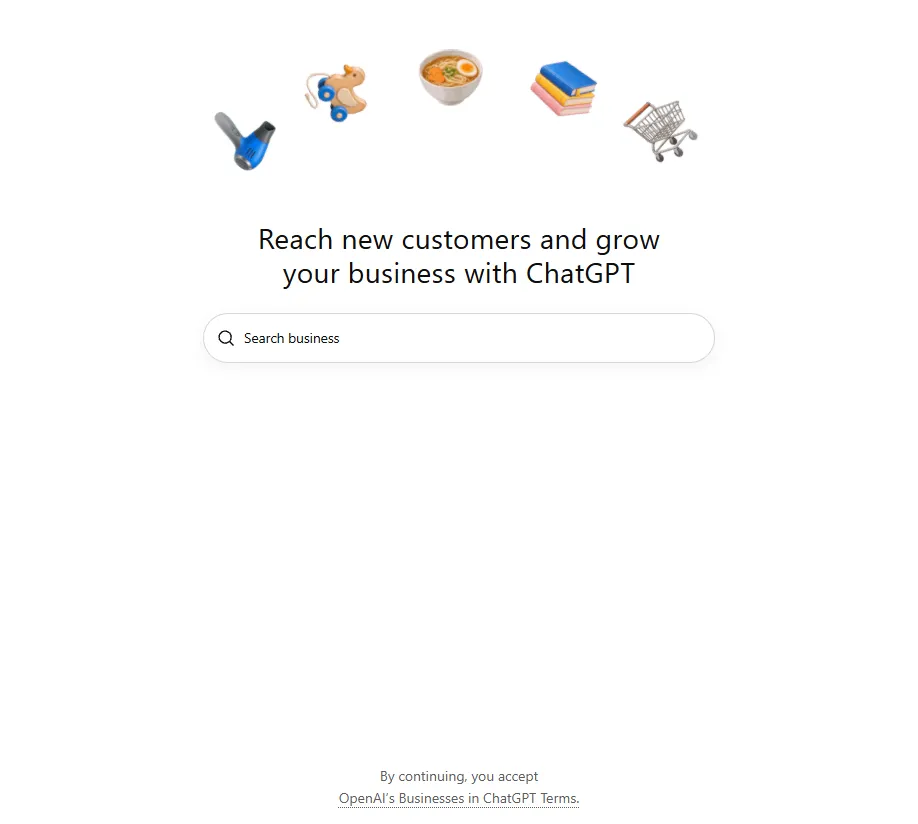
If your business isn’t listed and you run an eligible online business, you may see an option to add it. If you’re a local store or restaurant, you can currently only claim an existing US listing.
2. Select your listing and confirm the account
Choose the listing that matches your business and confirm which ChatGPT account will manage it. If the listing shows Contact support, it’s locked and you’ll need to request access. If someone else has already claimed it, open the profile, use the ••• menu and select Dispute ownership.
3. Verify your connection to the business
Pick one of the verification methods offered on your listing. The methods vary by listing, so you may not see all four.
| Method | What you do | Best for |
|---|---|---|
| Business phone | Get a code by text or automated call to the number shown | Businesses that answer the listed number |
| Business email | Get a code at the email address tied to the business | Businesses with a domain email on the listing |
| Website domain | Add the TXT record ChatGPT shows to your DNS, then select “Verify domain” | Anyone whose listed phone or email is out of date |
| Shopify store | Connect Shopify and log in to the store you’re claiming, or start from the ChatGPT app in your Shopify admin | Shopify merchants |
For the domain route, copy the type, host and value exactly as ChatGPT shows them. In most DNS panels the record looks like this:
Type:   TXT
Host:   @            (or the host ChatGPT shows you)
Value:  [paste the exact value from Business Hub]
TTL:    default
DNS changes can take a while to appear, so if verification fails straight away, wait and try again before assuming something’s wrong.
4. Wait for OpenAI to approve the claim
OpenAI reviews the claim and emails you a decision or a request for more information. You can cancel the claim while it’s under review. Approval gives you access to the business in Business Hub, but you still can’t publish changes or see insights yet.
5. Complete identity verification with Persona
From the business overview, select Complete verification with Persona and follow the instructions. Expect to need a government-issued ID, business registration information and proof that you can represent the business. This step is required even if you’ve already verified your domain or connected Shopify, and the blue check on your profile only appears after Persona approves you.
6. Fill in your profile and connect a product feed
Once both checks pass, update your website, description, category, logo, delivery policy, return policy and cover photo. OpenAI reviews changes before they go live, and its help article warns that updates can take time to show in answers, partly because ChatGPT also draws on other sources.
If you sell products, connect a feed. You can upload a CSV that follows OpenAI’s product feed specification, point to a hosted feed file, or connect Shopify, in which case your existing Shopify catalog is used and you don’t need a separate feed.
7. Add your team or agency
The admin who claimed the business can add teammates and give an agency access to manage the profile or its agent. Each person uses their own ChatGPT account, so don’t share your login or forward your claim invitation.
What to write in your profile
Everything you add has to follow OpenAI’s Businesses in ChatGPT policy, which bans fabricated reviews, unsupported guarantees and claims that hide fees or conditions. In practice, write the description the way you’d answer “what do you do and who is it for?” across a table: plain, specific and checkable.
This template works for most businesses. Fill it in, then cut anything you couldn’t prove if someone asked:
[Business name] is a [category] that helps [who you serve]
with [the main problem you solve] in [market or service area].
Main services or products: [3 to 5, in the words customers use].
Known for: [one specific, verifiable fact, e.g. founded in 2012,
ships across Canada, licensed in Washington State].
Website: [URL]   Contact: [phone or email customers should use]
Keep it consistent with your website, your Google Business Profile and your main directory listings. ChatGPT builds answers from all of them, and a profile that disagrees with everything else just adds noise.
What ChatGPT already says about you, and how to check
OpenAI’s own help center says ChatGPT may use other sources when answering questions about your business, and that’s not a small caveat. Before claiming anything, I asked ChatGPT what my own consultancy does. It gave an accurate summary built from 10 pages of my website plus a press release about my Canadian AI crawler study, with no claimed profile involved. It also found my town in my privacy policy, which is the only time a privacy policy has done any marketing for me.
So your profile is one input among many, and your website is still doing most of the talking. Run this check before you claim, then again a few weeks after your changes are approved:
What is [business name] and what do they do? Who are their
typical customers, where are they based, and what is their
website? List the sources you used.
Read the answer for wrong facts (old address, discontinued service, a competitor’s phone number) and note which sources it cites. Those cited sources are where corrections need to happen, and only some of them are your profile.
What the insights actually measure
Business Hub’s Insights tab shows aggregate activity over the past 28 days: mentions, website clicks and discovery topics, which group the themes of answers that mentioned or cited you. It’s the first time any AI assistant has handed businesses first-party data about how it talks about them, so it’s worth having even with its limits.
Read the definitions before you put any of it in a report, though:
- Mentions for an online business: a mention counts only when ChatGPT references your website. Being named without a link doesn’t count.
- Mentions for a local business: a mention counts when ChatGPT shows a result for that location, even if nobody opens the listing.
- Discovery topics: grouped themes. You never see the individual prompts anyone actually typed.
- Blank metrics: a blank can mean you’re under the reporting threshold or data is still being collected, so it doesn’t necessarily mean zero.
That first definition matters more than it looks. A brand that ChatGPT names often but rarely links will look quiet in Business Hub. If you track AI visibility yourself, keep counting mentions and citations separately, as I explain in my AEO strategy guide, and treat Business Hub as one more source instead of the scoreboard.
Who should claim a ChatGPT business profile now?
Almost everyone eligible should claim it, because it’s free and it stops someone else from controlling your facts. How much effort to put in after that depends on what you sell.
| Business type | What you can use today | My take |
|---|---|---|
| US ecommerce | Profile, product feed, insights, Business Agent | Claim now, connect the feed, test an agent on your top 20 customer questions |
| US online service | Profile, insights, Business Agent if your category qualifies | Claim now and fill in every field; the agent is optional |
| US local store or restaurant | Claim an existing listing, profile, insights | Claim it so the hours and address are right; expect less data at first |
| Businesses outside the US | Claim where ChatGPT is available and verification is supported; no Business Agent yet | Check whether your listing can be claimed; if it can, claim it for the insights |
| B2B and professional services | Profile and insights | Claim for accuracy and the data; your website and third-party mentions still matter more |
OpenAI hasn’t published a country-by-country list, so the only way to know for certain is to search for your business in Business Hub.
What a ChatGPT business profile won’t do
OpenAI is unusually blunt about this. Its help article says claiming “doesn’t guarantee increased visibility” or give you direct control over ChatGPT’s independent recommendations, and that advertising doesn’t influence those answers either.
That lines up with how ChatGPT picks businesses today. It recommends the companies the rest of the web talks about and cites the pages that answer the question best. A claimed profile makes sure the facts are right once you’re named. Getting named in the first place is still the work of ranking in ChatGPT: pages that answer real buyer questions, mentions on the sites AI already trusts, and crawlers that can reach you.
Where the profile fits in your AI visibility plan
The value of a profile shows up in two places. The first is accuracy at the moment of decision: a buyer comparing three firms in ChatGPT sees your current services, policies and products instead of whatever was true in 2023. The second is data. Website clicks from ChatGPT are a revenue-adjacent number you can now see from both sides, in Business Hub and in your analytics, so set up an AI assistants channel in GA4 and match the two.
If you’d like a second pair of eyes on how ChatGPT and the other engines describe your business, my free AI visibility audit checks your buyer questions across the main AI assistants by hand. For ongoing work, see AI search optimization, and if you’re weighing paid placement too, read how to advertise on ChatGPT.
FAQ
Is a ChatGPT business profile free?
Yes, claiming and managing a ChatGPT business profile is free. You don’t need an Ads account or a ChatGPT Enterprise agreement. ChatGPT Ads and Business Agents are separate, and only ads cost money.
How do I get my business on ChatGPT?
Claim it in Business Hub if a listing already exists, or add it if you run an eligible online business and the option appears. Beyond the profile, ChatGPT names businesses based on their own websites and what other sites say about them, so a crawlable website and third-party mentions still decide whether you come up.
How long does ChatGPT business verification take?
OpenAI doesn’t publish a timeline and says review time varies. There are two reviews: one for your claim and one for your Persona identity check, and OpenAI emails you after each.
Can I claim a ChatGPT business profile outside the US?
Possibly. OpenAI says any eligible business located where ChatGPT is available can claim, depending on its location and type. Local stores and restaurants can currently claim only existing US listings, and Business Agents are US-only for now.
Does claiming my business help it rank in ChatGPT?
No, not directly. OpenAI says claiming doesn’t guarantee more visibility or give control over ChatGPT’s independent recommendations. It helps ChatGPT show accurate information once your business comes up.
Can an agency manage my ChatGPT business profile?
Yes. The admin who claimed the business can invite teammates and grant an agency access from Business Hub. Each person signs in with their own ChatGPT account.
What happens if someone else already claimed my business?
Open the profile, select the ••• menu and choose “Dispute ownership”, then verify with Persona that you’re authorized to represent the business. Disputing doesn’t change how visible the profile is in the meantime.