


Google Search Console MCP: How to Connect GSC to Claude
There’s no official Search Console MCP from Google. Here are the three ways to connect it to Claude, how to check the numbers, and the prompts worth asking.


Contents
In a nutshell
- A Google Search Console MCP is a small connector that lets Claude call the Search Console API, so you can ask about clicks, queries, pages and indexing in plain English.
- Google does not publish an official Search Console MCP server as of November 2026, so every option is third-party code calling Google’s public API.
- There are three practical ways in: a hosted connector (fastest), an open-source server on your own machine (most control), or a desktop app that syncs your data locally (most history).
- Read-only access is enough for almost every question, and the popular open-source server asks for the full read/write scope, so set its write tools to off and give service accounts the lowest permission that works.
- The connection only earns its keep when you ask it better questions than the Performance report already answers, so start with the prompts below.
Summarize with AI
Search Console is where most SEO questions start, and it’s also where an afternoon goes to die: filter, export, pivot, compare, repeat. Connecting it to Claude turns that into a conversation. You ask which pages lost clicks since the last core update, and Claude pulls the rows, compares the periods and tells you.
This guide covers what a Google Search Console MCP actually is, the three ways to connect one to Claude (with copyable config for Claude Desktop and Claude Code), how to check it’s telling you the truth, what permissions to give it, and a set of prompts worth stealing.
What is a Google Search Console MCP?
A Google Search Console MCP is a server that exposes the Search Console API to an AI assistant through the Model Context Protocol, so Claude can request your performance, URL inspection and sitemap data and answer questions about it. You stay signed in with your own Google account or a service account, and Claude only sees the properties that account can see.
MCP is the plug standard and the server is the adapter that fits Search Console to it. If you want the longer version of where MCP fits next to Claude’s other ways of learning things, I covered that in Claude Skills vs MCP.
Is there an official Google Search Console MCP server?
No. Google’s list of supported MCP products, last updated October 30, 2026, covers Workspace apps like Gmail, Docs and Sheets, Maps and a long list of Cloud products, and Search Console isn’t on it. Google Analytics has its own official MCP server, which is probably why so many people assume Search Console got one too.
So every Search Console MCP you’ll find is built by someone other than Google. That isn’t a reason to avoid them, but it is a reason to read what each one asks permission to do.
Three ways to connect Search Console to Claude
The right option depends on how much setup you’ll tolerate and where you’re comfortable letting the data travel.
| Hosted connector | Open-source server | Local sync app | |
|---|---|---|---|
| Example | Windsor.ai | mcp-gsc (Amin Foroutan) | SEO Utils |
| Setup effort | A few minutes, no code | The most: Google Cloud project, credentials and a config file | Install the app, then a few clicks to turn on MCP |
| Google Cloud project needed | No | Yes | No |
| Where the data goes | Through the vendor’s servers | Your machine to Google, direct | Synced to your machine, Claude reads it there |
| History available | What the API returns (16 months) | What the API returns (16 months) | Everything synced, kept past 16 months |
| Write access | Read-only | Optional, off by default | Read-only for Search Console |
| Works in claude.ai on the web | Yes | No, not as a local install | No (local only) |
| Cost | Free plan for one data source, then paid | Free | $69 app licence plus $59.99 MCP add-on, one-time |
| Best for | Marketers who want it working today | People who want full control and no middleman | Consultants with many properties and long histories |
I use two of these. Windsor.ai is the Search Console source for my monthly client reports, and SEO Utils holds the long-run Search Console history I query when a client asks what happened two years ago. The split keeps reports on a connector I don’t have to maintain, while the history sits on my own machine, well past Google’s 16-month limit.
In the Claude app a remote MCP server is called a “connector”, while Claude Code calls it an MCP server, so don’t let the two names throw you.
Option 1: Connect a hosted Search Console connector
A hosted connector is the fastest route because someone else runs the server and handles Google sign-in. Windsor.ai is listed in Claude’s connector directory, and I’m using it as the example because it’s what I run, though any hosted Search Console MCP works the same way.
- Create an account with the vendor and connect your Google account to its Search Console source, choosing the properties you want available.
- In Claude, open Customize > Connectors. Search the directory for the vendor and click it, or click + Add, then Add custom connector.
- If you’re adding it as a custom connector, give it a name and paste the server URL (Windsor’s is https://mcp.windsor.ai), then click Continue and sign in when prompted.
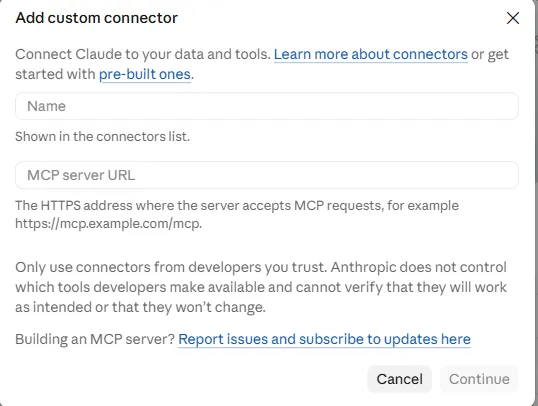
The custom connector dialog in Claude takes a name and the server’s HTTPS address. The warning at the bottom is worth reading before you paste anything in. - Start a new chat and ask Claude to list your Search Console properties. If it comes back with your sites, you’re connected.
Custom connectors work on every Claude plan, including Free, which is limited to one custom connector. On Team and Enterprise plans an owner has to add it first.
For Claude Code, one line does it:
claude mcp add --transport http windsor https://mcp.windsor.aiThe trade-off is that your Search Console data passes through a third party. For your own site that’s usually fine. For client properties, check the vendor’s data processing terms before you connect anything that isn’t yours.
Option 2: Run the open-source mcp-gsc server
mcp-gsc by Amin Foroutan is the most widely used community server, at about 2,100 GitHub stars and version 0.4.1 (September 2026). It’s written in Python, runs on your own machine, and talks to Google directly, with no vendor in the middle. It covers search analytics, period comparisons, URL inspection (single and batches of up to 10) and sitemaps.
The setup takes longer because you’re creating your own Google credentials.
Step 1: Create Google credentials
- In the Google Cloud console, create a project (or pick an existing one).
- Enable the Search Console API for that project.
- Go to APIs & Services > Credentials > Create credentials > OAuth client ID. Configure the consent screen if asked, choose Desktop app as the application type, and create it.
- Download the JSON file and save it somewhere permanent, like your Documents folder. Don’t put it inside a project folder that syncs to GitHub.
If you’d rather use a service account (useful for automation or a shared machine), create one under the same Credentials page, download its JSON key, and add the service account’s email address as a user on each Search Console property under Settings > Users and permissions.
Step 2: Install uv
The server runs through uvx, which downloads and updates it for you. Install uv from Astral’s install page, then find the full path to uvx:
- macOS or Linux: run
which uvxin Terminal (usually/Users/YOUR_NAME/.local/bin/uvx). - Windows: run
where uvxin Command Prompt (usuallyC:\Users\YOUR_NAME\.local\bin\uvx.exe).
Use the full path in the config. Claude Desktop doesn’t read your shell profile, so a bare uvx often fails with a spawn uvx ENOENT error.
Step 3: Add it to Claude Desktop
In Claude Desktop, open Settings > Developer > Edit Config. That opens claude_desktop_config.json, which lives at ~/Library/Application Support/Claude/ on a Mac and %APPDATA%\Claude\ on Windows. Add this, with your own paths:
{
  "mcpServers": {
    "gsc": {
      "command": "/FULL/PATH/TO/uvx",
      "args": ["mcp-search-console"],
      "env": {
        "GSC_OAUTH_CLIENT_SECRETS_FILE": "/full/path/to/client_secrets.json",
        "GSC_ALLOW_DESTRUCTIVE": "false"
      }
    }
  }
}
For a service account, swap the env block for "GSC_CREDENTIALS_PATH": "/full/path/to/service_account.json" and "GSC_SKIP_OAUTH": "true".
Save the file, then fully quit Claude Desktop and reopen it. Closing the window isn’t enough. The first time you use a tool, a browser window opens for Google sign-in, and the token is cached after that.
Or add it to Claude Code
claude mcp add --scope user gsc \
  -e GSC_OAUTH_CLIENT_SECRETS_FILE=/full/path/to/client_secrets.json \
  -e GSC_ALLOW_DESTRUCTIVE=false \
  -- /FULL/PATH/TO/uvx mcp-search-console
The --scope user flag makes it available in every project. Run claude mcp list afterwards, or type /mcp inside Claude Code, to check it connected.
A local server like this shows up in the Claude Desktop app and Claude Code, but you won’t see it in claude.ai in a browser tab.
Option 3: Query a local copy of your data (how I handle history)
Every option above asks Google’s API for data at the moment you ask, which means you get what Google keeps: 16 months of performance data, the window Search Console has offered since its 2018 redesign. Ask “how did this page do in spring 2024?” and the API has nothing to give.
SEO Utils takes a different approach. It’s a desktop app that syncs Search Console every day into a database on your own computer and keeps it past Google’s cutoff. Its MCP server then lets Claude query that local copy, binding to 127.0.0.1 only with a bearer token, so the data never leaves the machine. Claude writes SQL against the synced tables (queries, pages, query and page pairs, countries, devices, daily totals, indexing status), which is also why bigger questions don’t run into API quotas.
Setup is mostly clicking: you turn on the MCP server in the app’s settings and use its Connect an AI app picker, or add it to Claude Code with the command from its docs (macOS shown; the path differs on Windows):
claude mcp add --scope user seo-utils -- '/Applications/SEO Utils.app/Contents/MacOS/SEO Utils' mcp-stdioThe app has to be open for Claude to reach it. If Claude says it can’t connect, the fix is usually just opening SEO Utils.
This is the setup I’d pick if you manage several properties and want to compare years, not months. If you only look after one site and the last 16 months are enough, Option 1 or 2 is simpler.
How to verify your Search Console MCP numbers
Before you trust any answer, run three checks. They take five minutes and save you from building a recommendation on a mismatched number.
- Ask for your properties: “List my Search Console properties.” If one is missing, the Google account or service account you connected doesn’t have access to it.
- Match one number to the UI: ask for total clicks for one property over the last 28 days, then open the Performance report with the same dates and search type (Web). They should match closely. If they don’t, the usual cause is fresh versus final data: the API’s
dataStatesetting ofallincludes the last couple of days of preliminary data andfinalleaves it out. mcp-gsc lets you set this withGSC_DATA_STATE. - Ask how many rows it pulled: the Search Analytics API returns 1,000 rows per request unless the server asks for more, up to a maximum of 25,000. On a big site, “all my queries” may really mean “the top 1,000”. Ask Claude to say how many rows it received and whether the result was capped.
Security: read-only scopes and the lowest permission that works
The Search Console API has two OAuth scopes: webmasters for read/write and webmasters.readonly for read-only. Analysis only needs read-only.
The popular mcp-gsc server requests the full webmasters scope in its code, because it also offers sitemap submission and site management. Its destructive tools (add or delete a site, delete a sitemap) stay off unless you set GSC_ALLOW_DESTRUCTIVE to true, so leave that at false. Sitemap submission through manage_sitemaps is a separate tool, so if you never want Claude touching sitemaps, say so in your instructions or pick a read-only server.
For service accounts, keys and client data, I’d also stick to these rules:
- Service accounts: add them as a Restricted user first. Google’s permissions table gives restricted users view rights on most data, including the Performance report, but lists URL Inspection as “fetch only” and doesn’t allow sitemap submission. Upgrade to Full only if a tool you need fails.
- Keys and secrets: keep
client_secrets.jsonand any service account key out of shared folders and Git repositories. Treat them like a password. - Client data: a hosted connector means a third party processes your client’s search data. Check that your client agreement allows it.
- Prompt injection: Anthropic’s own connector guidance warns that a malicious server can carry hidden instructions. Install servers from publishers you can identify, and watch what tools get called.
Quotas rarely bite on normal use, but they exist. Google’s limits allow 1,200 Search Analytics queries per minute per site, and URL Inspection is capped at 2,000 calls per day and 600 per minute per site. If you ask Claude to inspect a 5,000-page site, it will run out of road partway through.
Prompts to copy
These work with any of the three setups. Swap in your own property and dates. Each one asks for something the Performance report can’t give you in one screen.
Compare the last 28 days with the previous 28 days for [site]. List the 10 pages that lost the most clicks, with clicks, impressions, CTR and average position for both periods. Tell me whether each loss came from fewer impressions or a lower CTR.Find queries for [site] in average positions 8 to 20 over the last 3 months with at least 50 impressions. Group them by the page that ranks. For each page, tell me which query is closest to page one.Show queries where [site] has high impressions but a CTR below 1% in positions 1 to 5 over the last 28 days. These are title and description problems. Suggest a new title for the top 5.Which queries return more than one of my pages for [site] in the last 3 months? List the query, each page, and the clicks each page got. Flag pairs where the two pages split clicks roughly evenly.Split clicks for [site] into branded and non-branded queries by month for the last 16 months. Brand terms are: [your brand names]. Tell me whether non-branded clicks are growing, flat or shrinking.Inspect these URLs on [site] and tell me which are not indexed, the coverage state for each, and the last crawl date: [paste up to 10 URLs].Check the sitemaps for [site]. Report any with errors or warnings, and compare the number of submitted URLs with what I’d expect for a site this size.Before you answer, tell me the date range, search type and number of rows you pulled, and whether the result was capped.I’d tack prompt 8 onto the end of every other one, because it makes Claude show what it actually pulled before it starts interpreting.
A real run of the striking-distance prompt
I ran a version of prompt 2 against a client’s property (a local youth sports facility) through my Windsor connection: last 28 days, positions 8 to 20, at least 30 impressions. Six queries came back. Leaving out the branded ones, three were worth a look:
| Query | Impressions | Clicks | CTR | Avg. position |
|---|---|---|---|---|
| batting cages near me | 259 | 10 | 3.9% | 8.3 |
| baseball cost | 102 | 0 | 0% | 10.0 |
| what age is 8u baseball | 35 | 0 | 0% | 9.4 |
“Batting cages near me” is the money query, since people searching it want to book something this week and the page already sits at the edge of page one. The other two are informational and could be answered by an FAQ on an existing page rather than new posts. In the Performance report, the same list takes a date range, a position filter and an impressions filter before you can even start reading.
A Search Console MCP speeds up diagnosis but can’t see revenue
A Search Console MCP makes diagnosis faster. It doesn’t make it right, and it can’t see revenue. Search Console knows clicks and positions; it has no idea which of those clicks booked a call or bought something. The questions that matter to a business, like which pages bring leads and which queries are worth defending, still need Search Console joined with GA4 or your CRM. For keyword and competitor data Search Console doesn’t have, I compared the two main SEO data connectors in Semrush MCP vs DataForSEO MCP.
So the best use is triage: let Claude find what moved, then spend your own time on the pages tied to money. It’s the same split I describe in Claude for SEO, where the assistant does the digging and you make the calls.
If you’d like someone to set this up for your team, or to turn what it finds into a plan, that’s what my SEO consulting and SEO audit work covers.
FAQ
Is there an official Google Search Console MCP?
No. As of November 2026, Google publishes MCP servers for Google Analytics, Google Ads, Workspace apps and many Cloud products, but not for Search Console. Every Search Console MCP is third-party software that calls Google’s public Search Console API.
Is a Google Search Console MCP free?
The open-source servers are free, and you only need a free Google Cloud project to use them. Hosted connectors usually have a free tier with limits and paid plans above it. Desktop apps like SEO Utils charge a one-time licence.
Does the Search Console MCP work in claude.ai in my browser?
Only if it’s a hosted (remote) connector added under Customize > Connectors. Local servers like mcp-gsc and SEO Utils run on your computer, so they work in the Claude Desktop app and Claude Code but not in a browser tab.
Can Claude change my Search Console settings through MCP?
Only if the server offers write tools and the account has permission to use them. mcp-gsc can submit sitemaps, and its add-site and delete tools stay disabled unless you turn them on. Use a read-only connector, or a Restricted service account, if you want no changes at all.
How much Search Console history can Claude see?
Through the API, 16 months, the same as the Performance report. To query older data you need a tool that has been syncing and storing it, such as SEO Utils, or your own export to BigQuery.
Can I connect several client properties at once?
Yes. Claude can see every property the connected Google account or service account can access, and you name the property in each prompt. For client work, keep a list of exact property names (for example sc-domain:example.com) handy, because URL-prefix and domain properties are separate and return different numbers.
Does the Search Console MCP work with ChatGPT too?
Usually, yes. MCP is an open standard: hosted connectors such as Windsor document ChatGPT and Gemini setups, and mcp-gsc documents Cursor, Codex CLI and Gemini CLI. The setup screens differ, but the server and credentials are the same.