


GPTBot: Should You Block OpenAI’s Crawler?
What OpenAI’s training crawler actually does, what blocking it changes (less than most people think), who in Canada blocks it, and the robots.txt rules to copy for each choice.


Contents
Read this if your coffee is getting cold
- GPTBot is OpenAI’s training crawler: it collects public web pages that may be used to train OpenAI’s AI models.
- Blocking GPTBot does not remove your site from ChatGPT search, because ChatGPT search uses a separate crawler called OAI-SearchBot.
- In my October 2026 study of 372 Canadian websites, 14% blocked GPTBot, almost all of them news sites, while none of the 29 banks, insurers and fintechs did.
- Most businesses that want to be recommended by ChatGPT should leave GPTBot allowed, and publishers who sell their content have a real case for blocking it.
- Check your CDN or firewall too, because a Cloudflare setting can block GPTBot even when your robots.txt allows it.
Summarize with AI
Should you block GPTBot? For most businesses the answer is a fairly boring no, while publishers have a more interesting decision to make. I read OpenAI’s current crawler documentation and checked the robots.txt files of 372 Canadian websites to see who’s actually blocking it.
You’ll find what GPTBot is, how it differs from OpenAI’s other two crawlers, what blocking it really changes, and the robots.txt rules to copy for each choice. There’s also a short check to confirm the GPTBot in your server logs is really OpenAI.
What is GPTBot?
GPTBot is OpenAI’s web crawler for AI training. It visits public web pages and collects content that may be used to train OpenAI’s generative AI models, and it follows the rules you set for it in your robots.txt file.
OpenAI’s crawler documentation describes it this way: “Disallowing GPTBot indicates a site’s content should not be used in training generative AI foundation models.” That’s the whole job. GPTBot doesn’t decide whether you appear in ChatGPT search, and it has nothing to do with your Google rankings.
GPTBot identifies itself with this user-agent string (OpenAI notes the version number may change):
Mozilla/5.0 AppleWebKit/537.36 (KHTML, like Gecko); compatible; GPTBot/1.4; +https://openai.com/gptbotOpenAI publishes the IP addresses GPTBot crawls from in gptbot.json. When I checked on November 1, 2026, the file listed 18 IPv4 ranges and was last generated on September 22, 2026. You’ll use that file later to confirm a visitor calling itself GPTBot is real.
GPTBot, OAI-SearchBot and ChatGPT-User do three different jobs
OpenAI runs three main crawlers, and you control each one separately. OpenAI says each setting “is independent of the others”, so you can block training and stay in ChatGPT search, or the reverse.
| Crawler | What it does | What blocking it does | Follows robots.txt? | IP list |
|---|---|---|---|---|
| GPTBot | Collects content that may be used to train OpenAI’s models | Tells OpenAI not to use your content for training. Your ChatGPT search visibility doesn’t change. | Yes | gptbot.json |
| OAI-SearchBot | Finds and indexes pages for ChatGPT’s search features | Removes your pages from ChatGPT search answers. They can still appear as navigational links. | Yes, changes take about 24 hours | searchbot.json |
| ChatGPT-User | Visits a page when a ChatGPT user or custom GPT asks it to | Not reliably controlled by robots.txt. OpenAI says “robots.txt rules may not apply” because a person started the request. | Not always | chatgpt-user.json |
A fourth agent, OAI-AdsBot, only visits landing pages submitted as ChatGPT ads, and OpenAI says its data isn’t used for training. If you don’t buy ChatGPT ads, you can ignore it. (If you’re thinking about it, I’ve written about how advertising on ChatGPT works.)
OpenAI also notes that if you allow both GPTBot and OAI-SearchBot, it may use one crawl for both jobs to avoid hitting your site twice. So seeing fewer GPTBot visits than you expected doesn’t mean anything is broken.
Other AI companies split their crawlers the same way. Anthropic has ClaudeBot for training and Claude-SearchBot for search, for example. I’m covering ClaudeBot, and the choice between OAI-SearchBot and PerplexityBot, in separate guides, so this one sticks to GPTBot.
What blocking GPTBot actually changes
Blocking GPTBot changes one thing: OpenAI is asked not to use your pages to train future models. It doesn’t remove you from ChatGPT search, it doesn’t affect Google, and it doesn’t stop ChatGPT from opening your page when a user pastes your link.
Three limits apply to that rule:
- Not retroactive: robots.txt only affects future crawling. Content collected before you added the rule isn’t pulled out of models that were already trained.
- A request, not a lock: robots.txt is a voluntary standard. OpenAI uses it as the control for GPTBot, but if you need enforcement, you need a firewall rule (more on that below).
- Some lost brand memory: when ChatGPT answers without searching the web, it relies on what the model learned in training. If your pages aren’t in that training data, the model knows less about you first-hand. Nobody can measure exactly how much this matters, OpenAI included, so I’d treat it as a modest risk, not a disaster.
How much that third limit costs depends on what you sell. For a newspaper, being in the training data means giving away the product. For a dental clinic or a B2B software company, it means the model has a better chance of knowing who you are and what you do.
Who’s blocking GPTBot? Data from 388 Canadian websites
In October 2026, I checked the robots.txt files of 388 well-known Canadian websites for my study of who’s blocking AI crawlers in Canada. I could read 372 of them, and the GPTBot numbers show a very clear split between companies that sell content and everyone else.
| Group | Sites read | Block GPTBot |
|---|---|---|
| News and media | 93 | 46 (49%) |
| French-language news | 22 | 82% |
| English-language news | 71 | 39% |
| Banking and finance | 29 | 0 |
| Government | 63 | 1 (2%) |
| Retail | 40 | 1 (3%) |
| All sites | 372 | 51 (14%) |
Outside news, only five sites in the whole study block GPTBot: Amazon.ca, BC Ferries, Wattpad, the Government of Manitoba and George Brown College. The Big Six banks, the telecoms and every energy company leave it alone.
Of the 51 sites that block GPTBot, 23 still allow OAI-SearchBot. They’ve opted out of training while staying visible in ChatGPT search, which is exactly the split OpenAI’s documentation describes. Quebecor’s papers, including Le Journal de Montréal and TVA Nouvelles, take this approach. The other 28 block both, which takes them out of ChatGPT search answers too.
Some sites go the other way and roll out the welcome mat. 13 of them write an explicit Allow: / rule for GPTBot, including iA Financial, belairdirect, Jobber and Gildan. Since crawlers are allowed by default, that line doesn’t change anything technically, but it shows someone on the team made the call on purpose.
Should you block GPTBot? A decision table by business type
For most businesses, no. If you want ChatGPT to recommend you, letting OpenAI learn from your public pages costs you very little and might help. Block it when your content is the product you sell, or when you’re bound by licensing or client agreements.
| Your business | Block GPTBot? | Why |
|---|---|---|
| Local service business (plumber, dentist, clinic) | No | You want to be known and recommended. Your service pages aren’t something people pay to read. |
| B2B or SaaS company | No | Buyers ask ChatGPT for shortlists. Product, pricing and comparison pages should be easy for AI to learn from. |
| Ecommerce store | No, usually | Product information helps you get recommended. Consider blocking only if your original guides or reviews are a paid asset. |
| Law firm, accountant, consultant | No | Your expertise is your marketing. Keep any client-only portals behind a login, which crawlers can’t see anyway. |
| News publisher or subscription media | Probably yes | Your content is what you sell. Block GPTBot, then decide separately about OAI-SearchBot based on how much traffic ChatGPT sends you. |
| Course creator, research or data seller | Maybe | Block the folders that hold paid or premium content, and allow the marketing pages. |
| Content under a licence or syndication deal | Check the contract | Some agreements decide this for you. |
If you’re in the “no” rows and still uneasy, you have a middle path: allow GPTBot on your marketing pages and block it from specific folders. The snippets below cover that.
robots.txt rules for GPTBot you can copy
Your robots.txt file sits at yourdomain.com/robots.txt. Pick the snippet that matches your decision and add it to that file.
A crawler’s own group replaces your general rules, which trips people up. Under the robots.txt standard (RFC 9309), a crawler that finds a group with its own name follows only that group and ignores the general User-agent: * group. So if your * group blocks folders like /cart/ or /account/, and you add a separate GPTBot group, copy those folder rules into the GPTBot group too.
Allow all OpenAI crawlers
Most businesses need nothing extra here. If your file only has User-agent: * with Allow: /, you’re already done. You only need named rules if you want to make the choice explicit:
User-agent: GPTBot
User-agent: OAI-SearchBot
Allow: /
Block training, stay in ChatGPT search
23 of the Canadian sites in my study block GPTBot and allow OAI-SearchBot, which looks like this:
User-agent: GPTBot
Disallow: /

User-agent: OAI-SearchBot
Allow: /
Block GPTBot from one section only
Paid courses, member content and research libraries are the usual candidates:
User-agent: GPTBot
Allow: /
Disallow: /courses/
Disallow: /members/
Block every OpenAI crawler that follows robots.txt
This also takes you out of ChatGPT search answers, so only use it if that’s what you want:
User-agent: GPTBot
User-agent: OAI-SearchBot
Disallow: /
ChatGPT-User isn’t in that last snippet on purpose. OpenAI says robots.txt rules may not apply to it, so if you really need to stop it, that has to happen in your firewall, using the IP ranges in chatgpt-user.json.
Chateau Mojo’s own robots.txt is two lines and a sitemap: User-agent: * and Allow: /. Every OpenAI crawler is welcome, because I’d much rather ChatGPT knows what I do than not. Cloudflare agrees: GPTBot’s Block toggle is off in AI Crawl Control for my site.
Check your CDN before you trust your robots.txt
Your robots.txt can welcome GPTBot while your CDN quietly turns it away. Cloudflare is the most common case, since it announced on July 1, 2025 that new domains would start with AI crawlers blocked by default.
Cloudflare controls this in two places:
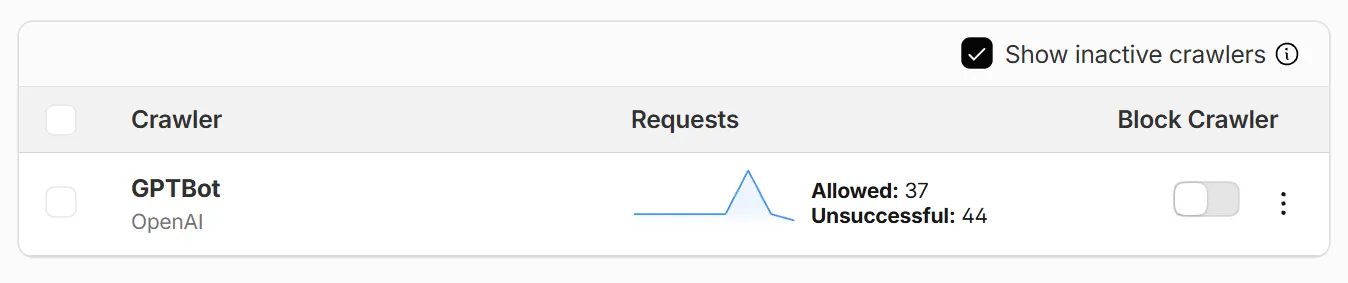
- AI Crawl Control: in your Cloudflare dashboard, choose your domain and open AI Crawl Control. The Crawlers tab lists each AI crawler, how many requests it made, how many times it ignored your robots.txt, and whether it’s set to Allow or Block. Cloudflare’s documentation says blocking a crawler there creates a firewall (WAF) rule, so it’s a real block, not a polite request.
- Managed robots.txt: if you set the Training policy to Disallow and turn on Bot Preference Sync, Cloudflare adds its own rules to the top of your robots.txt, including
User-agent: GPTBotwithDisallow: /. Open your live robots.txt in a browser to see what crawlers actually receive, not the file on your server.
If you use another firewall, WordPress security plugin or host-level bot protection, check its bot settings the same way. Accidental blocks are common, and they’re quiet: nothing breaks, you just stop showing up.
How to verify GPTBot in your server logs
Anyone can put “GPTBot” in a user-agent string, so a log line that says GPTBot proves nothing on its own. The real check is the IP address: genuine GPTBot traffic comes from the ranges OpenAI publishes in gptbot.json.
- Pull every request that claims to be GPTBot from your access log. On a typical Apache or Nginx server, where the IP address is the first field of each line:
grep "GPTBot" access.log | awk '{print $1}' | sort | uniq -c | sort -rn- Download the current IP list from
https://openai.com/gptbot.json. It changes, so don’t hardcode it. - Check each IP against those ranges. This short Python script does steps 2 and 3 together:
import ipaddress, json, sys, urllib.request

ranges = json.load(urllib.request.urlopen("https://openai.com/gptbot.json"))
nets = [ipaddress.ip_network(p.get("ipv4Prefix") or p.get("ipv6Prefix"))
        for p in ranges["prefixes"]]

for line in open(sys.argv[1]):
    if "GPTBot" in line:
        ip = ipaddress.ip_address(line.split()[0])
        real = any(ip in n for n in nets)
        print(ip, "real GPTBot" if real else "FAKE: not in OpenAI's list")
Save it as check_gptbot.py and run python3 check_gptbot.py access.log. Swap the URL for searchbot.json or chatgpt-user.json to check OpenAI’s other agents.
- If you’re on Cloudflare, AI Crawl Control lists known AI crawlers by name with their request counts, which is a quicker first look than the script.
OpenAI also says it may add a robots.txt marker to GPTBot’s user-agent string when it fetches your robots.txt file. If your logs don’t record paths, that marker shows you which requests were just GPTBot reading the rules.
Being readable is the floor, not the finish
Allowing GPTBot and OAI-SearchBot gets you into the room. It doesn’t get you recommended, because ChatGPT still has to understand what you do, trust your pages, and see other sites mention you, and none of that happens because of a robots.txt line.
That’s why I’d spend five minutes on the robots.txt and CDN check, then put the real effort into the pages and mentions that decide whether AI cites you. How to rank in ChatGPT covers that side, and Bing Webmaster Tools covers the Bing route into Copilot and ChatGPT. If you’d like me to check both your crawler access and whether ChatGPT actually names you for the searches your buyers make, that’s what my AI visibility audit does. And if you’re wondering about the other file AI crawlers look for, llms.txt explained covers it.
FAQ
Does blocking GPTBot remove my site from ChatGPT?
No. Blocking GPTBot only tells OpenAI not to use your content for model training. ChatGPT search uses OAI-SearchBot, and OpenAI says sites that opt out of OAI-SearchBot won’t be shown in ChatGPT search answers.
Does blocking GPTBot affect my Google rankings?
No. GPTBot is OpenAI’s crawler and has no connection to Google Search. Google’s crawlers are separate, and blocking GPTBot doesn’t change how Googlebot sees your site.
How do I block GPTBot?
Add User-agent: GPTBot followed by Disallow: / to your robots.txt file. To block it from one folder only, use Disallow: /folder-name/ instead. If you use Cloudflare, you can also block it in AI Crawl Control, which enforces the block with a firewall rule.
What is the GPTBot user agent?
GPTBot’s user-agent string contains GPTBot/1.4 and the link +https://openai.com/gptbot. The version number can change, so match on “GPTBot” in your rules and log searches rather than the full string.
Does GPTBot respect robots.txt?
OpenAI says it uses robots.txt to let site owners control GPTBot, and disallowing GPTBot signals your content shouldn’t be used for training. Robots.txt is still a voluntary standard, so if you need certainty, block GPTBot’s published IP ranges at your firewall and watch your logs.
Does blocking GPTBot remove my content from ChatGPT’s existing training data?
No. Robots.txt only affects future crawling. Anything collected before you added the rule stays in models that were already trained.
Can ChatGPT still read my page if I block GPTBot?
Yes, in two ways. OAI-SearchBot can still index your pages for ChatGPT search unless you block it separately, and ChatGPT-User can open a page when someone asks ChatGPT to look at it.