


How to Track AI Overviews for Your Keywords
Search Console’s new AI report shows which pages appear in Google’s AI answers, but not which searches or whether anyone clicked. Here’s how I fill the gaps: the citation footprint, a scheduled keyword list, and the leads behind them.


Contents
The bit to remember
- Tracking AI Overviews means answering three questions for each keyword: does an AI Overview appear, does it cite your site, and which competitors does it cite instead.
- Search Console’s Generative AI report shows how often your pages appeared in AI Overviews and AI Mode combined, but only as impressions by page, country and device, with no queries and no clicks.
- The fastest way to see where Google’s AI Overviews already cite a site is a ranked keywords report filtered to AI Overview references, which works on day one with no setup.
- Third-party AI Overview data is a snapshot from whenever the keyword was last checked, so confirm any keyword that matters with a live check before you act on it.
- Clicks from AI Overviews arrive in GA4 as ordinary Google organic traffic, so judge AI Overview work by citations and by the leads from the pages that earn them.
Summarize with AI
Google finally added a generative AI report to Search Console this year, and it’s useful, but it tells you which pages showed up in AI answers without telling you which searches triggered them or whether anyone clicked.
So tracking AI Overviews still means stitching a few sources together. I’ll cover what Search Console’s new report does and doesn’t show, how I find every keyword where a site is already cited, how to check a keyword list on a schedule, what to record, and what it all costs. The examples use real data I pulled on November 18, 2026.
What does tracking AI Overviews actually measure?
Tracking AI Overviews means recording, for a fixed list of keywords, whether Google shows an AI Overview, whether your pages are cited in it as sources, where they sit among those sources, and which other sites are cited. Over time that tells you which keywords you’re gaining or losing in Google’s AI answers, and which competitors keep getting picked instead of you.
It’s a different job from tracking classic rankings. A page can rank sixth and still be cited in the AI Overview, and a page ranking first can be left out of it. You need both views, side by side.
The ways to track AI Overviews, compared
| Method | What it tells you | Cost | Main limit |
|---|---|---|---|
| Manual checks in Google | Whether an AI Overview shows and who it cites, right now | Free | Slow, and results vary by location and session |
| Google Search Console (Generative AI report) | Impressions in AI Overviews and AI Mode, by page, country, device and day | Free | No queries, no clicks, and AI Overviews and AI Mode are combined |
| Ranked keywords filtered to AI Overview references | Every keyword where your site is already cited, with volume | About 1 to 2 cents per report | A snapshot from the last time each keyword was checked |
| Scheduled checks of a keyword list | AI Overview presence and citations over time for keywords you choose | A few dollars a month for most small sites | You only see the keywords you track |
| GA4 | Leads and sales from organic Google traffic | Free | AI Overview clicks look like any other organic click |
I use the last four together. The first one is for spot checks.
What Search Console shows (and what it doesn’t)
Google launched a Generative AI performance report in Search Console in June 2026, and by August 31 it had rolled out to every site. You’ll find it under Performance, then Generative AI, in the left menu.
The report has one metric: impressions, which Google defines as how many times links to your site were shown in a generative AI feature. AI Overviews and AI Mode are counted together. You can break the number down by page, country, device and day, filter by text or multimodal search, and export it. There are no clicks, no click-through rate, no position and no queries.
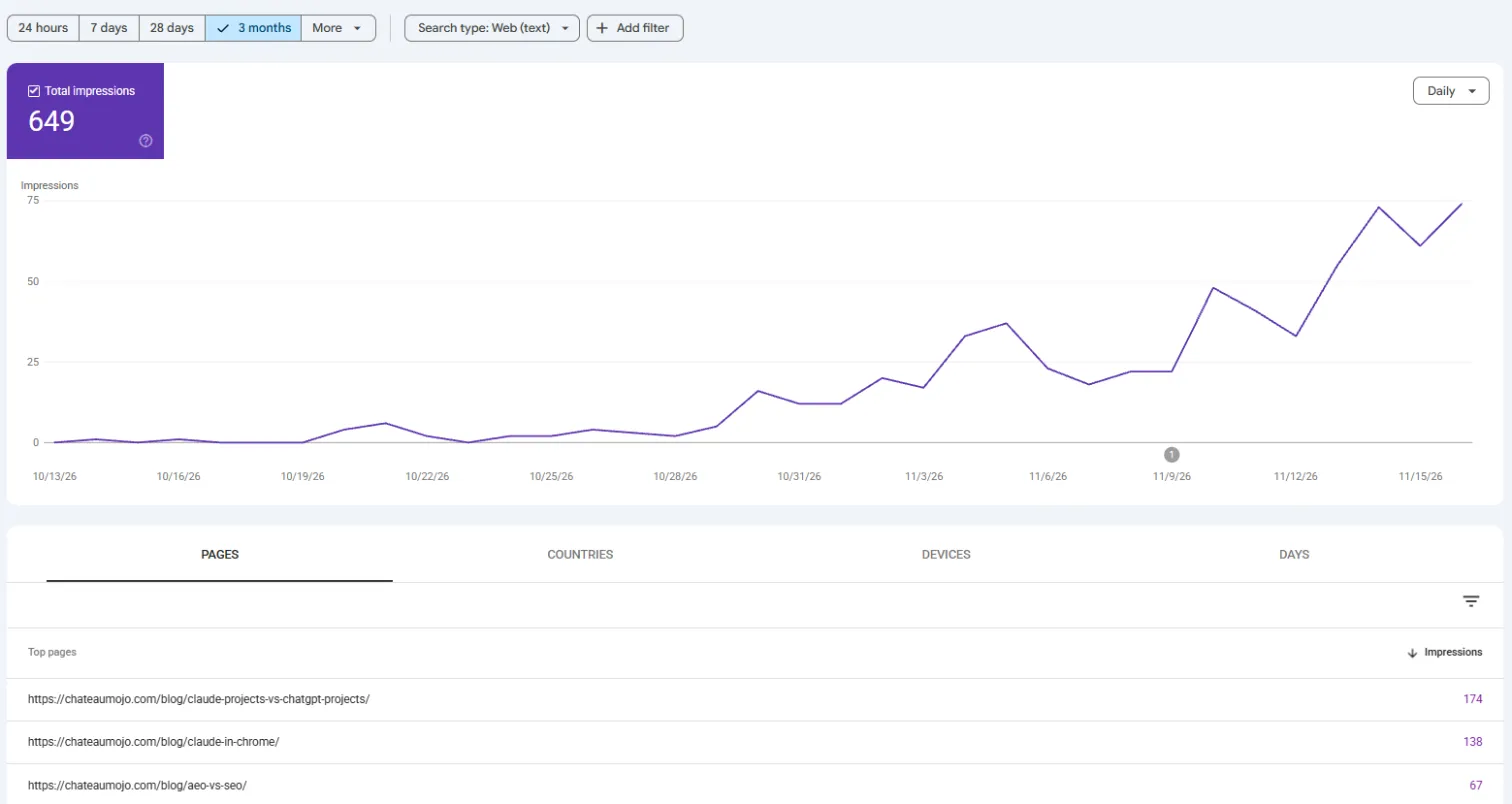
That makes it good for one job: seeing which pages Google’s AI answers are already pulling from, and whether that’s growing. On my own site, the report showed 649 impressions with most of them landing in the last three weeks, led by a comparison post and a tool guide. What it can’t tell me is which searches those were, or whether the AI Overview or AI Mode drove them.
AI feature traffic still counts in the regular Performance report too, under the “Web” search type, where it’s mixed in with everything else. The Search Console help page on clicks and position explains how it’s counted there. A click on an external link in an AI Overview counts as a click, standard impression rules apply, and an AI Overview occupies a single position in the results, with every link inside it given that same position. AI Mode follows the normal results page position rules, and a follow-up question in AI Mode counts as a new query.
That shared position is why AI Overviews can look strange in your regular data. If the overview sits at the top of the page, every site it cites gets an average position near 1 for that query, even if its classic blue link ranks much lower.
To connect the two reports, take a page that gets AI impressions and open it in the regular Performance report. Look for queries where impressions held steady or rose, average position stayed about the same, and click-through rate dropped. Those are your likely AI Overview queries, so check them by hand or with a tool to see whether an AI Overview appears and who it cites. Treat that as a lead to investigate, because a new ad block or a competitor’s rich result can cause the same pattern.
Find every keyword where AI Overviews already cite you
This is where I start with every new client, because it needs no tracking history. DataForSEO Labs has a ranked keywords endpoint that lists the keywords a domain appears for in Google, and you can filter it to one result type: ai_overview_reference, meaning the domain is cited as a source in the AI Overview.
Swap your domain and location into the request below and send it as a POST to /v3/dataforseo_labs/google/ranked_keywords/live:
[
  {
    "target": "example.com",
    "location_code": 2840,
    "language_code": "en",
    "item_types": ["ai_overview_reference"],
    "limit": 100,
    "order_by": ["keyword_data.keyword_info.search_volume,desc"]
  }
]
Location code 2840 is the United States. Each result gives the keyword, its monthly search volume, the URL Google cited, and the dates DataForSEO last checked that search results page. DataForSEO prices live Labs requests at $0.012 per request plus $0.00012 per result, so a 100-keyword report costs about 2.4 cents.
What this looks like for a real site
I ran it for Less Annoying CRM, a small business CRM that also came up in my AI share of voice test. DataForSEO found it cited in AI Overviews for 119 keywords in the US. The top five by search volume:
| Keyword | Monthly searches (US) | Page Google cited |
|---|---|---|
| monday.com price | 3,600 | /crm-pricing/how-much-does-monday-com-cost |
| monday.com pricing | 3,600 | /crm-pricing/how-much-does-monday-com-cost |
| bad communicators | 590 | /blog/how-to-deal-with-a-bad-communicator |
| monday.com cost | 390 | /crm-pricing/how-much-does-monday-com-cost |
| crm for insurance agency | 320 | /industry/insurance-agent |
A CRM’s biggest AI Overview citations come from a page about a competitor’s pricing, which hints at the kind of content Google’s AI likes to cite. The footprint also includes keywords that will never bring in a customer (“bad communicators” comes from an old blog post), so filter for relevance before you report a total. And the cited page title still said “2024” while being cited for 2026 searches.
Check the snapshot date before you act
The dates on each row matter, because in that Less Annoying CRM report some keywords were last checked on November 8, 2026 and others in early September. An AI Overview can change a lot in two months.
So before I recommend work on a keyword, I check it live. On November 18 I searched “monday.com price” with a live results scraper, and Less Annoying CRM was still cited, fourth of six sources in the AI Overview, while its classic result ranked sixth on the page. The live check took a minute and confirmed the snapshot.
Track a keyword list on a schedule
The citation footprint shows where you already are. To see change over time, and to watch keywords where you’re not cited yet, you need to check a fixed keyword list on a schedule.
- Pick 20 to 100 keywords that matter for revenue: your service and product terms, the questions buyers ask, and the keywords where competitors are cited and you aren’t.
- Choose a tool that records the AI Overview as well as the rankings. I use the SEO Utils LLM Rank Tracker, which covers Google AI Overviews and AI Mode alongside ChatGPT. For one-off live checks I use Cloro, which returns the AI Overview text and its sources for any search.
- Run the list on the same schedule each time. Monthly is enough for most sites, and weekly helps during a content push.
- Record the same fields every run (the template is below).
- Compare each run with the last one, keyword by keyword: new AI Overviews, citations gained, citations lost, and new competitors in the sources.
Cloro charges about 5 credits for a Google search with the AI Overview through its async API, and its $30 Lite plan includes 37,500 credits, so 100 keywords a month uses a small fraction of the cheapest plan and cost isn’t a reason to skip this.
What to record for each keyword
date | keyword | volume | ai_overview_shown | we_are_cited | our_source_position | our_cited_url | our_organic_rank | competitors_cited
2026-11-18 | monday.com price | 3600 | yes | yes | 4 | /crm-pricing/how-much-does-monday-com-cost | 6 | monday.com, reddit.com, plaky.com
The our_organic_rank column is there on purpose. Keeping classic rank next to citation status shows you, over a few months, how closely the two move for your site.
Connect AI Overviews to leads in GA4
Clicks from an AI Overview land in GA4 as Google organic traffic, the same as a click on a blue link. You can’t split them out, and I’d be wary of any method that claims to do it precisely.
Follow the pages instead. Take the URLs that earn AI Overview citations from your footprint report, and watch their organic sessions, leads and sales in GA4 month over month. If the pages Google’s AI cites are the pages that convert, that’s the case for doing more of the same work. For visits from ChatGPT, Perplexity and other AI assistants that do show up separately, I set up a custom channel, covered in the AEO tools I actually use.
Where tracking AI Overviews meets revenue
Tracking is only worth the time if it changes what you work on. The useful output each month is a short list: keywords where a competitor is cited and you’re not, pages that lost a citation, and cited pages that are out of date. Fix those and check again next month.
AI Overviews sit inside Google, so classic SEO still does a lot of the work. Pages that are indexed, clearly answer the question and come from a site Google trusts are the ones that get cited. If you’d like this mapped for your site, my AI visibility audit includes the AI Overview footprint and the competitor gaps, and technical SEO covers the foundations underneath. If you’re also trying to understand AI Mode, start with my guide to Google AI Mode.
FAQ
Can you track AI Overviews in Google Search Console?
Partly. The Generative AI report in Search Console shows impressions in AI Overviews and AI Mode combined, broken down by page, country, device and day. It doesn’t show queries, clicks or position, so you still need another source to see which keywords trigger a citation.
Is there a free AI Overview checker?
Google itself is the free checker: search the keyword and look at the AI Overview and its sources. It’s fine for a handful of keywords, but results vary by location and session, so for a keyword list a paid tool or API is more reliable.
How do I know if my site is cited in an AI Overview?
Run a ranked keywords report for your domain filtered to AI Overview references, which lists every keyword where your site was cited when last checked. Then confirm the keywords that matter with a live search, because AI Overviews change.
Can I track AI Overview clicks in GA4?
No. Clicks from AI Overviews arrive in GA4 as Google organic traffic and look the same as other organic clicks. Track the organic sessions and conversions of the pages that earn AI Overview citations instead.
Do I need to rank first to be cited in an AI Overview?
No. In my live check, Less Annoying CRM was cited in the AI Overview for “monday.com price” while its classic result ranked sixth. Strong rankings help, but Google picks AI Overview sources per answer.
How many searches show AI Overviews?
It depends heavily on the type of query, so an industry-wide percentage won’t tell you much about your own keywords. Check your keyword list: the share of your tracked keywords that show an AI Overview is the number that matters for your site.
How often should I track AI Overviews?
Monthly works for most businesses. Check weekly while you’re actively publishing or updating content for keywords that show AI Overviews, and always run a live check before acting on older data.