


The AEO Tools I Actually Use (and the Ones I Dropped)
Every month I run the same buyer questions through five AI engines for clients. This is the stack behind it: what each tool does, what it really costs, the tools I cancelled and why, and how to test one before you pay.


Contents
The bit to remember
- AEO tools measure whether AI assistants like ChatGPT, Gemini, Perplexity and Google’s AI features name your brand and cite your pages, and some also suggest fixes.
- My stack does five jobs: running a fixed set of buyer questions on each engine, mapping where Google’s AI Overviews cite a site, counting visits and leads from AI assistants, reading the first-party data engines now share, and checking live answers for research.
- Pulling AI answers through an API costs fractions of a cent each, so the real cost of AEO tracking is the time it takes to read the results and act on them.
- I dropped a market-sample mention metric as my headline, a live SERP feed that started returning wrong pages (DataForSEO has since shipped an optional fix), and share-of-voice percentages, because none of them held steady enough to report.
- A dedicated platform is worth paying for when a team needs a dashboard more than it needs raw answers, and the deciding test is whether it lets you set your own prompts and export what the AI actually said.
Summarize with AI
Every month I run the same buyer questions through five AI engines for clients and turn the answers into a report someone can act on. Getting there took a few months of buying, testing and quietly cancelling tools, and some of those cancellations taught me more than the tools I kept.
This is that stack: what each tool does, what it costs, the gotchas I hit, the tools I dropped and why, and how to decide whether you need a dedicated platform at all. I don’t sell any of these tools, and none of them pays me.
What are AEO tools?
AEO tools are software that measures how often AI assistants mention your brand and cite your website in their answers, and in some cases recommend changes to improve it. Answer engine optimization is the practice of getting named in those answers, and I’ve covered it on its own in what answer engine optimization is.
The category is young and blurry. The same kind of product gets sold as an AEO tool, a GEO tool, an AI visibility tracker, an LLM tracker or an AI rank tracker. Underneath the labels, nearly all of them do some mix of the same five jobs, and it’s easier to pick tools by job than by name.
The five jobs an AEO stack has to do
| Job | The question it answers | What I use |
|---|---|---|
| 1. Prompt tracking | When a buyer asks our questions, does the AI name us, cite us, or name a competitor? | SEO Utils LLM Rank Tracker, plus DataForSEO LLM Responses for the engines it lacks |
| 2. AI Overview citation footprint | On which Google keywords does the AI Overview already cite our site? | DataForSEO Labs ranked keywords, filtered to AI Overview references |
| 3. Visits and leads | Are AI assistants sending people who convert? | GA4 with a custom AI assistants channel |
| 4. First-party engine data | What do the engines themselves report? | Bing Webmaster Tools AI Performance, and now ChatGPT Business Hub insights |
| 5. Live checks for research | What does this answer or results page look like right now? | Cloro |
If a tool you’re considering doesn’t clearly do at least one of these, it’s probably a content writer with an AEO sticker on it.
Job 1: tracking a fixed set of buyer questions
This is the headline of every AI visibility report I send. I write 10 to 25 unbranded questions a buyer would ask before choosing a provider, get the client to approve them, freeze them as version 1, and run them on the same engines every month. The method is covered step by step in my 90-day AEO strategy.
SEO Utils LLM Rank Tracker
SEO Utils is a desktop SEO app sold on a one-time license, and its LLM Rank Tracker runs your prompts on ChatGPT, Google AI Overviews and Google AI Mode. For each answer it records whether you’re mentioned, your position in the list, the pages cited and the competitors named, and it keeps the full history in a local database I can query.
It runs on your own API keys, and in my setup the data costs about $1.20 per 1,000 queries plus a small model charge to extract the brand names. That’s cheap enough that cost never decides how many prompts I track.
The gotcha cost me a month of clean data. The weekly schedule only runs while the app is open, so one client’s “weekly” tracker produced three snapshots in four weeks, with a 20-day gap in the middle. I now run it by hand between the 1st and 3rd of each month and report one snapshot per month.
DataForSEO LLM Responses
SEO Utils doesn’t cover Gemini, Perplexity or Claude, so for those I send the same prompts through DataForSEO’s LLM Responses API, which returns the answer text and the URLs each engine cited. DataForSEO prices it at $0.0006 per request plus whatever the AI model itself charges per task.
Keep the prompt list identical across both tools. If the questions drift, the engine rows in your report stop being comparable, and nobody notices until a client asks why Perplexity looks so different.
Job 2: finding where Google’s AI Overviews already cite you
Search Console now has a Generative AI performance report, but it only gives impressions by page, country and device, with AI Overviews and AI Mode lumped together and no queries. To see which keywords trigger a citation, the workaround I use is DataForSEO Labs’ ranked keywords endpoint with the item type set to ai_overview_reference, which lists every keyword where a domain is cited as a source in the AI Overview, with search volume for each.
It needs no setup and no history, so it works on day one for a brand-new client. It also shows which pages Google’s AI already trusts, which is often a better place to start fixing than the page you assumed was your best one. I walk through the method, with a request you can copy, in how to track AI Overviews.
Job 3: counting visits and leads from AI assistants
Visibility only pays when it turns into visits and leads, and this part of the stack is free. In GA4 I add a custom channel called “AI assistants” with one Source rule that matches a regex of the assistants’ names:
.*(perplexity|chatgpt|openai|gemini|claude|copilot).*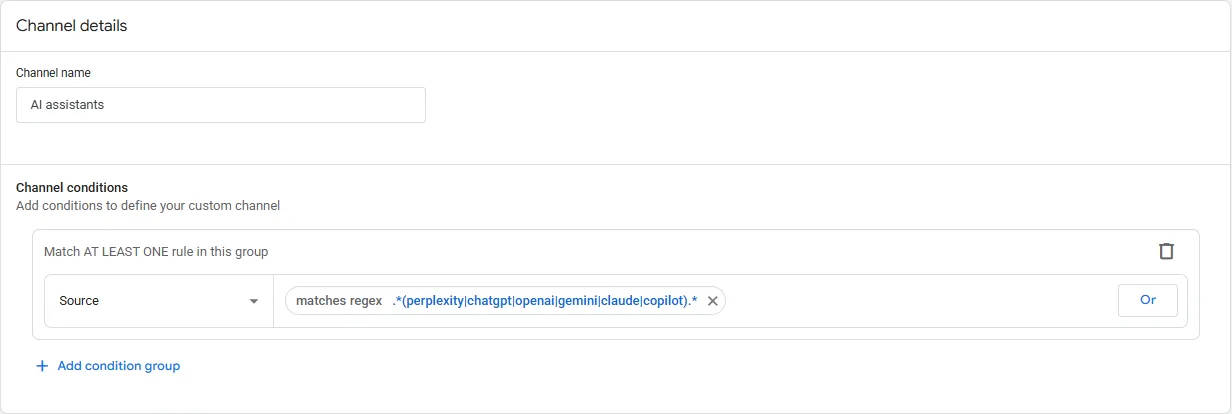
Then I attach the client’s real conversion events (form fills, calls, booked demos) to that channel. Of everything in this stack, that’s the number budgets should follow, and it costs nothing but ten minutes of setup.
Job 4: reading the data the engines report themselves
Two engines now share first-party data, and both are free:
- Bing Webmaster Tools AI Performance: Microsoft’s report shows how often your pages are cited across Copilot and Bing’s AI answers. I covered setup in my Bing Webmaster Tools guide.
- ChatGPT Business Hub insights: since November 10, a claimed ChatGPT business profile shows mentions, website clicks and discovery topics over the past 28 days.
Read the definitions before you lean on either. OpenAI only counts a mention for an online business when ChatGPT references the website, so a brand that’s named without a link looks quieter in Business Hub than it is.
Job 5: checking live answers and results pages
For research (what a results page looks like today, which sources an AI Overview cites, what ChatGPT says about a client), I use Cloro, an API that scrapes Google, AI Overviews, AI Mode, Gemini and ChatGPT. On its $30 Lite plan, 37,500 credits cover roughly 5,000 ChatGPT answers at 7 credits each, which works out to well under a cent per answer.
I didn’t plan on adding a second data provider. I moved live Google checks to Cloro because of a problem described further down.
What the whole stack costs
Here’s a realistic monthly bill for one mid-sized client: 15 questions, five engines, one run a month. That’s 75 AI answers plus one AI Overview footprint pull.
| Item | Monthly cost (approx.) | Notes |
|---|---|---|
| SEO Utils | One-time license | Data billed through your own API keys |
| Prompt tracking data, 75 answers | Around $1, depending on each model’s charge | ChatGPT, AI Overviews and AI Mode through SEO Utils; Gemini, Perplexity and Claude through DataForSEO |
| AI Overview footprint | A few cents | One DataForSEO Labs call |
| GA4, Bing AI Performance, Business Hub | Free | |
| Cloro for research | $30 plan, shared across all work | Not per client |
The data is nearly free. Reading 75 answers, merging competitor names (one AI calls it “Segment”, another “Twilio Segment”), checking cited pages and writing up what changed is where the hours go. Any tool that claims to save you money should be judged on that part.
The AEO tools I dropped, and why
Each of these looked fine in a demo and fell apart once I tried to report on it month after month.
| Dropped | What went wrong | What replaced it |
|---|---|---|
| A market-sample mention count as the headline metric (DataForSEO LLM Mentions) | It counts mentions in the provider’s own prompt sample, which is redrawn every month. The same month never returned the same number twice, and one B2B client showed three mentions in total, mostly on unrelated pages | A fixed, client-approved question set. The sample number stays as small-print context |
| DataForSEO’s live Google results for spot checks | Since late September 2026, many queries came back as a normal-looking first page full of the wrong sites. In a November test on 10 client keywords, 7 came back wrong while the same searches through Cloro looked right. On 16 November DataForSEO released an optional fix that checks the page and swaps in verified results, at the cost of one extra page per request | Cloro for live Google results for now; DataForSEO stays for keyword data, Labs and LLM answers |
| Scheduled weekly tracking | The desktop schedule only runs while the app is open | A manual monthly run between the 1st and 3rd |
| A second ChatGPT scraper | Duplicated the tracker’s ChatGPT data at a higher cost | Nothing; one source per engine |
| Sentiment scores in client reports | I couldn’t confirm the scores read correctly on real answers | Kept internal until they’re checked |
| Share-of-voice percentages | The percentage changes depending on which competitors go in the denominator, and the AI picks those, not you | A count and rank: “named in 9 of 50 answers, 3rd among all firms named” |
That last one surprises people, so I’ve written up the reasoning in how to measure AI share of voice. The short version is that one client’s data gave 8% or 33% depending on which competitors I counted, and both numbers were technically true.
Why I don’t pay for a dedicated AEO platform (yet)
Dedicated platforms like Peec AI, Otterly and Profound bundle prompt tracking, competitor views and a dashboard into one subscription. I haven’t paid for one, and that’s mostly down to how my reports work rather than the quality of the platforms.
| API stack (mine) | Otterly Lite | Peec AI Starter | |
|---|---|---|---|
| Price | Data around $1 per client per month, plus setup time | $29/month | $95/month |
| Prompts included | As many as you want to pay for | 20 | 50 |
| Engines | Any the APIs cover | 3 of 7 on this plan | ChatGPT, Perplexity, AI Overviews, AI Mode, Gemini and more |
| Raw answers you own | Yes, in your own database | Check before you buy | Check before you buy |
| Dashboard | You build it | Included | Included |
Prices from each vendor’s pricing page on November 18, 2026.
I’d buy one tomorrow in three situations: a client’s in-house team wants to log in and look themselves, I’m tracking dozens of brands and the dashboard saves more hours than it costs, or nobody on the team is comfortable with an API. Those are real situations, and for plenty of businesses a $29 plan is the sensible start.
How to test an AEO tool before you pay
Run these checks during any free trial. They take about an hour and they catch most of the problems I’ve hit:
- Use your own prompts: Load 10 buyer questions you wrote yourself. If the tool only reports on prompts it generates or samples, you can’t move the number with your work.
- Check it against reality: Ask three of those questions yourself in fresh ChatGPT and Gemini sessions, then compare with what the tool recorded on the same day. AI answers vary between runs, so expect small differences, not a different set of brands.
- Look for mentions and citations as separate columns: Being named and being linked are different problems with different fixes.
- Export the raw answers: If you can’t get the actual answer text and cited URLs out, you can’t audit the tool, change tools later or explain a strange month to a client.
- Ask how competitors are counted: You want to see every brand the AI named, merged sensibly, not a competitor list you typed in at setup.
Which AEO tools fit which business
| You are | Start with | Add later |
|---|---|---|
| A small business checking 10 questions | A spreadsheet, fresh AI sessions by hand once a month, and the GA4 channel | A low-cost platform plan if the hand checks become a chore |
| A marketing team that wants a dashboard | A dedicated platform, chosen with the five checks above | GA4 conversions on AI traffic, so the dashboard connects to leads |
| An SEO or agency tracking several clients | A tracker that stores raw answers, plus an AI Overview footprint pull | An API layer for the engines your tracker lacks |
| An ecommerce brand | A claimed ChatGPT business profile with a product feed, plus prompt tracking | Bing AI Performance and AI Overview footprint |
Where AEO tools meet revenue
None of these tools makes you more visible. They tell you whether the work you’re doing is landing, and the stack is only worth paying for if someone reads the output and changes pages, earns mentions or fixes a blocked crawler because of it. That’s why the GA4 channel is the cheapest tool here and also the most important one: it ties the whole thing to leads.
If you’d rather see your numbers before buying anything, my free AI visibility audit runs your buyer questions through the main engines by hand. For ongoing tracking and fixes, see answer engine optimization services. And if you want to compare the two big data APIs before building anything, I tested them side by side in Semrush MCP vs DataForSEO MCP.
FAQ
What is the best AEO tool?
There isn’t one best AEO tool, because they do different jobs. For prompt tracking, pick a tool that lets you set your own questions and export raw answers. For leads, the best tool is free: a GA4 channel for AI assistant traffic with your conversions attached.
Are there free AEO tools?
Yes. GA4, Bing Webmaster Tools’ AI Performance report and ChatGPT Business Hub insights are all free, and checking 10 questions by hand each month in fresh AI sessions costs nothing but time. Paid tools start to make sense when the question list grows.
What’s the difference between an AEO tool and an AI visibility tracker?
Mostly the label. An AI visibility tracker focuses on measuring mentions and citations in AI answers, while “AEO tool” can also cover content and optimization features. Many products are sold under both names.
How much do AEO tools cost?
Dedicated platforms I checked in November 2026 start at $29 a month for 20 prompts (Otterly) and $95 a month for 50 prompts (Peec AI). Building on APIs costs around a dollar a month in data for 75 answers, but you pay in setup and reading time.
Can I track ChatGPT rankings?
You can track whether ChatGPT names your brand, where it appears in the list and which pages it cites, for a fixed set of questions. There’s no single ChatGPT ranking, because answers vary by run, wording and user, so track the same questions monthly and read the trend.
How many prompts should an AEO tool track?
Start with 10 buyer questions for a local or small business and 15 to 25 for a national brand. Keep them unbranded and fixed, so changes in the numbers reflect changes in the answers, not in your list.