


What Is Google AI Mode? What Changes for Your Traffic
Google’s conversational search answers the question before anyone clicks. Here’s how AI Mode works, where it hides in Search Console, and what five sites’ data shows about traffic.


Contents
The bit to remember
- Google AI Mode is a conversational search mode inside Google Search that answers with an AI-written response and a set of source links instead of a page of ranked results.
- AI Mode splits each question into subtopics and runs many searches at once, a technique Google calls query fan-out.
- AI Mode clicks and impressions are counted in your normal Search Console Performance report, and since August 31, 2026 every site also gets a Generative AI report that shows impressions only.
- Independent clickstream data puts AI Mode above 90% zero-click, so expect more visibility per visit, not more visits.
- Site owners can now exclude their content from AI Mode and AI Overviews in Search Console, though for most businesses that hands the spot to a competitor.
Summarize with AI
Google says AI Mode passed a billion monthly users this year. Your analytics probably don’t show a billion of anything new, and the gap between those two numbers is what this guide is about.
What is AI Mode, how does it differ from the search results you already know, and where does it show up in your reports? I answered those from Google’s own documentation, then pulled 15 months of Search Console data from five sites I work on to see what it’s doing to real traffic. You’ll also get a simple way to decide what to do about it.
What is Google AI Mode?
Google AI Mode is a conversational search mode inside Google Search that answers your question with an AI-written response, a set of source links and room for follow-up questions, instead of a page of ranked results. Google’s AI Mode help page calls it the company’s most powerful AI search experience, and Google launched it in the United States in May 2025.
For site owners, the important detail is how AI Mode finds sources: it splits your question into subtopics and searches for each one at the same time, a technique Google calls “query fan-out”, then stitches the results into one answer with links. So a single question can pull from pages that rank for a dozen different searches.
You can reach AI Mode three ways: at google.com/ai, by tapping the AI Mode button after typing a search on google.com, or from the Google app. It takes text, voice, images, PDFs and even a pasted URL. Google says it may show a plain list of links when it isn’t confident enough in an AI answer.
AI Mode has changed a lot since its US launch:
- At I/O 2026, Google made Gemini 3.5 Flash the default model in AI Mode worldwide. Google’s help page also lists Gemini 4 Argon as a model option in AI Mode, with daily usage limits that are higher on paid Google AI plans.
- Also since I/O 2026, a searcher can ask a follow-up straight from an AI Overview and land in AI Mode without ever pressing the AI Mode button.
- With Personal Intelligence, AI Mode can use your search history and, if you connect them, Gmail and Google Photos, so two people asking the same question can get different answers.
How AI Mode differs from AI Overviews and classic results
AI Overviews are the summary box that appears on top of a normal results page. AI Mode is a separate, conversational screen where the AI answer is the page. Search Console treats them differently too, which explains some odd numbers in your reports.
| Classic results | AI Overviews | AI Mode | |
|---|---|---|---|
| What the searcher sees | Ranked list of pages | AI summary above the normal results | AI answer with links, in a chat-style screen |
| How it starts | Any search | Google decides to show it | AI Mode button, google.com/ai, or a follow-up from an AI Overview |
| Follow-up questions | New search | Flow into AI Mode | Built in |
| Position in Search Console | Standard ranking position | All links share one position | Standard position rules; each follow-up counts as a new query |
| Typical clicks | Highest of the three | Lower when the box appears | Lowest of the three |
The Search Console rules come from Google’s definitions of impressions, position and clicks: clicking an external link in AI Mode counts as a click, and a follow-up question counts as a brand new query with its own impressions and positions.
If you’re comparing AI Mode with the Gemini app, I cover that separately in Google AI Mode vs Gemini.
How much traffic does AI Mode send?
AI Mode sends very little traffic per search, and every independent dataset I found points the same way, even though they disagree on how big AI Mode is.
Semrush looked at clickstream data for almost 69 million US desktop Google sessions from May to July 2025 and found that only 6% to 8% of AI Mode sessions led to a visit to another website. That makes AI Mode roughly 93% zero-click, compared with about 34% for regular searches without an AI Overview and about 43% with one. The same study found AI Mode queries averaged 7.22 words, against 4.0 for regular searches.
The AI Overviews side has stronger evidence. In a randomized field experiment, researchers at the Indian School of Business and Carnegie Mellon found that AI Overviews cut outbound organic clicks by 39.8% on the searches where they appeared. The same paper tested an AI Mode condition, and its early results suggest an even bigger drop in traffic to publishers.
How many searches actually happen in AI Mode is where the sources split. Google says AI Mode has more than 1 billion monthly users and that its query volume has more than doubled every quarter since launch. SparkToro, working with Similarweb’s US panel, found that only 0.34% of Google searches went to AI Mode from January to April 2026, while 68% of all Google searches ended without a click.
Both can be true, because a billion monthly users can still add up to a small share of all searches if most people use AI Mode now and then, and SparkToro’s window closed before Google merged AI Overviews and AI Mode into one flow at I/O. It does mean that nobody’s industry average tells you what’s happening on your site, so I went and looked at mine.
Where AI Mode shows up in Search Console
AI Mode data lives in two places in Search Console, and neither one gives you a clean AI Mode click count.
The first is your normal Performance report. Google says sites shown in AI features, including AI Mode, are counted in the overall search traffic in the “Web” search type. There’s no filter to separate AI Mode clicks from classic results.
The second is newer. Google added a Generative AI performance report in June 2026, and as of August 31, 2026 every website has it. It shows how often your pages appeared in AI Overviews and AI Mode, by page, country, device and date. It shows impressions only, though, with no clicks, and AI Overviews and AI Mode are lumped together.
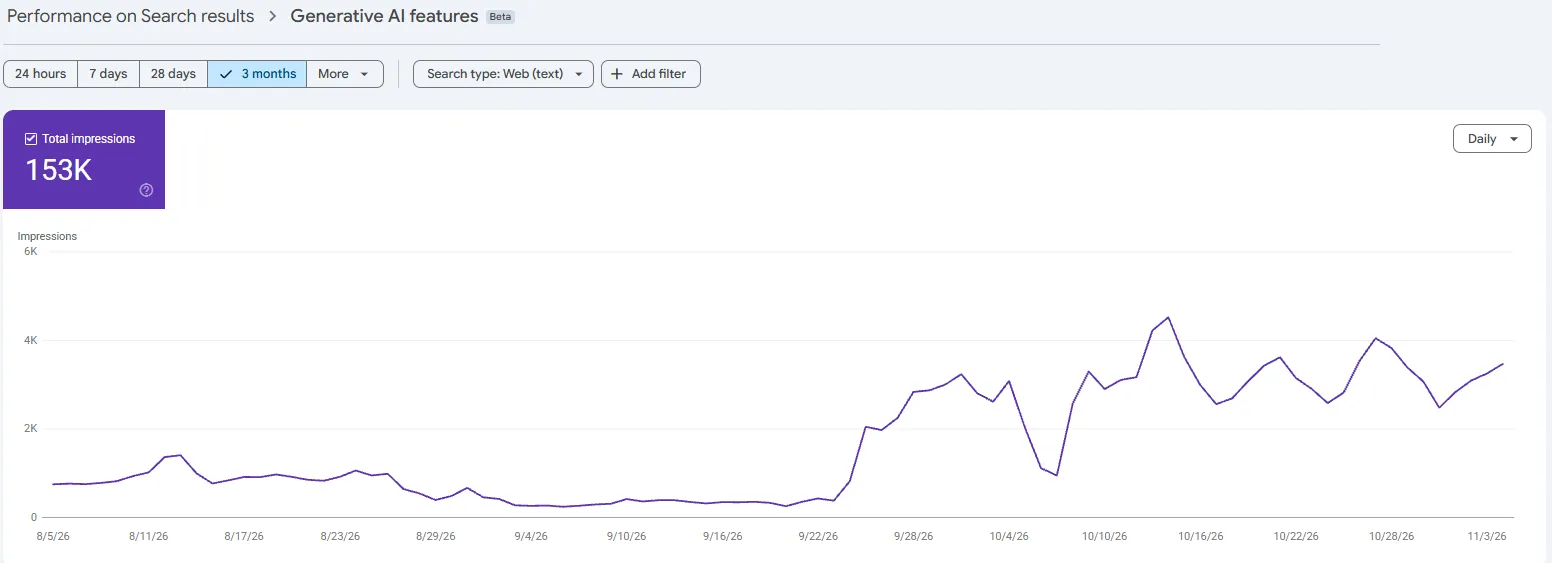
To check your own site:
- In Search Console, open Performance, then Search results, then Generative AI.
- Set the date range to 3 months and the view to Daily, then look for a step change like the one above.
- Open the Pages tab to see which URLs AI features show most.
- Go back to the main Performance report, keep the same dates, and check whether clicks to those same pages moved.
- In the main report, add a Query filter, choose Custom (regex), and paste the pattern below to isolate searches of seven words or more, which is close to the average AI Mode query length.
^(\S+\s+){6,}\S+$If the Generative AI report doesn’t appear at all, Google says that usually means your site hasn’t earned enough impressions in AI features yet, or that someone excluded the site (more on that below).
What I found in 15 months of client Search Console data
I pulled Search Console data for five client sites through the Windsor.ai connector and filtered for queries of seven words or more, since that’s where AI Mode searches cluster. Google’s own US data says the average AI Mode search is three times the length of a regular query. I compared October 2025 with October 2026. Client names stay private.
| Site | Long-query impressions, Oct 2025 | Long-query impressions, Oct 2026 | Change | Long-query clicks, Oct 2025 | Long-query clicks, Oct 2026 |
|---|---|---|---|---|---|
| B2B software platform | 4,639 | 26,292 | +467% | 0 | 1 |
| Health and fitness publisher | 6,955 | 17,409 | +150% | 174 | 245 |
| Health testing ecommerce brand | 96,085 | 142,803 | +49% | 765 | 2,525 |
| Supplement brand | 1,161 | 5,302 | +357% | 4 | 69 |
| Industrial equipment supplier | 7,280 | 9,402 | +29% | 45 | 44 |
Long-query impressions went up on all five sites, from 29% to 467%. Clicks didn’t follow one pattern, which is the useful part.
The B2B software site picked up 26,292 impressions on long queries in October and exactly one click. I’ve seen better click-through rates on unsubscribe links. For a buyer researching software, the answer often ends inside Google.
The health publisher grew long-query clicks, but its click-through rate on those queries fell from 2.5% to 1.4%. The two other health brands grew long-query clicks a lot, so longer questions aren’t automatically lost traffic.
Three of the sites saw long-query impressions jump between February and March 2026. The B2B site went from 11,071 to 22,349, the health publisher from 8,247 to 30,540, and the supplement brand from 2,713 to 8,458. Search Console can’t tell me whether that came from AI Mode, AI Overviews or classic results, so I’m reporting it as a pattern, not a cause.
The Generative AI report told a sharper story for the health publisher. Its AI feature impressions sat around a few hundred a day in early September 2026, then climbed to mostly 2,000 to 4,500 a day from late September, about 153,000 over three months. Over the same stretch its total organic clicks went 21,586 in August, 17,730 in September and 19,783 in October. That’s roughly ten times the AI visibility with clicks that barely moved.
Keep in mind this is five sites, not a study. Search Console also hides rare queries for privacy, so filtered totals undercount, and none of these numbers can isolate AI Mode from the rest of Google. Use it as a reason to check your own data, not as a benchmark. If you want to see which keywords Google’s AI already cites you for, I cover that in how to track AI Overviews.
What AI Mode changes for your traffic
Impressions go up while CTR goes down: AI features show your pages to far more people than click them, so a falling site-wide click-through rate is often a sign you’re being cited more, not ranking worse. Judge pages on clicks and conversions instead.
Informational questions turn into brand exposure: Long, how-does-this-work questions are the ones AI Mode answers best. They’re still worth covering because they get you cited, but measure them as visibility, not as a lead source.
The clicks you do get arrive later in the buying process: Someone who clicks out of an AI answer has usually had the basics explained already, so the page they land on has to finish the job with pricing, proof, comparisons or a booking path.
Ranking reports get fuzzier: Personal Intelligence means AI Mode answers vary from person to person, so any AI Mode “rank” from a third-party tool is an estimate.
The fundamentals still decide who gets cited: Google’s guide to optimizing for generative AI features says AI features rely on its core ranking systems and that you don’t need special markup or tactics like chunking content. The work is helpful content that ranks, on a site Google can crawl.
The table below is how I’d respond to each pattern you might find in Search Console.
| What you see | What it usually means | What I’d do |
|---|---|---|
| Generative AI impressions up, clicks flat | You’re being cited more without getting more visits | Keep the pages included, report them as visibility, and link them to your commercial pages |
| Clicks down on pages that used to bring leads | AI answers are satisfying the question before the click | Use the regex filter to find which long queries lost clicks, then add what an AI answer can’t give: your pricing, data, examples and next step |
| Long-query impressions rising, near-zero clicks | Your content feeds answers to research-stage buyers | Make sure your brand and product names appear in those pages so citations carry your name |
| No Generative AI report at all | Too few AI impressions, or the site is excluded | Check the exclusion setting below, then work on ranking for the questions your buyers ask |
Should you exclude your site from AI Mode?
Since August 31, 2026, every site owner can opt out of AI Overviews, AI Mode and generative AI features in Discover with the Search generative AI control in Search Console, under Settings, then Search generative AI. Only property owners can change it.
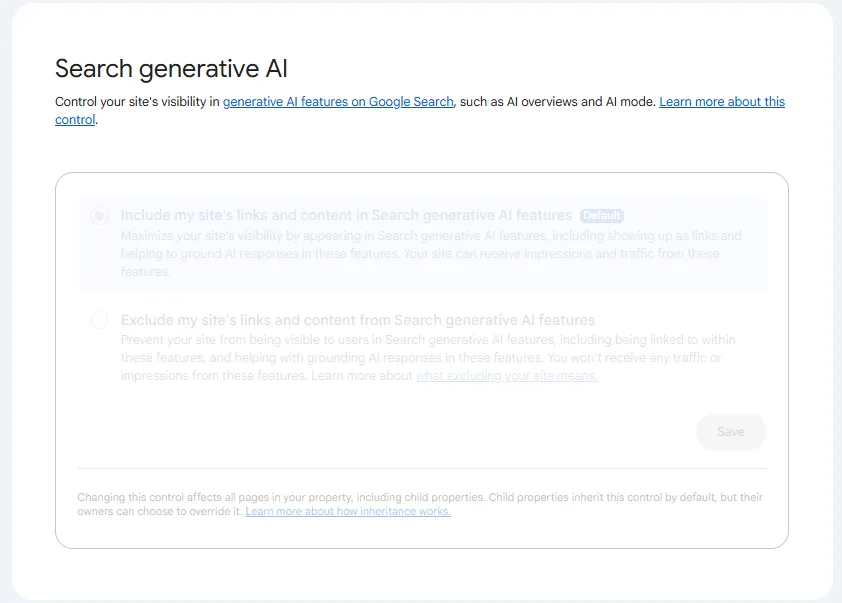
Excluding your site stops your links and content from appearing in those AI features and stops Google from using your pages to ground its AI answers. Google says the setting doesn’t affect rankings in the rest of Search, usually takes effect in one to two days, and doesn’t control AI training. For training, the separate Google-Extended setting still applies, and Google has said it plans to support a shared AI training signal in robots.txt alongside other AI companies in 2027.
For most businesses I’d leave it on “Include”. Google’s own help page notes that content from other sites will still appear in AI answers, so opting out mostly hands your spot to a competitor. The exception is a publisher whose product is the information itself, like a paywalled research firm, where every AI answer built on your work replaces a visit you’d otherwise sell. If that’s you, test the setting on a URL-prefix child property (one folder) before you change it for the whole domain, because child properties can override the parent.
If you were looking for how to switch AI Mode off as a searcher, that’s a different question, covered in how to turn off Google AI Mode.
Where this leaves your search budget
AI Mode changes what a ranking is worth. Pages that answer pure informational questions now earn citations more than visits, while pages that help someone choose, compare or buy still earn the clicks that turn into revenue. I’d keep a tight set of commercial pages ranking and converting, cover the research questions well enough to be cited, and track the two separately so a falling CTR doesn’t scare anyone into the wrong move.
If you want to know where your brand shows up in AI answers today, an AI visibility audit is the quickest way to find out. For the ongoing work, my answer engine optimization services cover both Google’s AI features and the assistants outside Google, and how to rank in ChatGPT explains the non-Google side.
FAQ
Is Google AI Mode free?
Yes, AI Mode is free to use in the countries and languages Google supports. Its most advanced model option, Gemini 4 Argon, has daily usage limits that are higher on paid Google AI plans.
What does “Dive deeper in AI Mode” mean?
“Dive deeper in AI Mode” is the option under an AI Overview that carries your search into AI Mode so you can ask follow-up questions. In Search Console, each follow-up counts as a new query with its own impressions and clicks.
How do I see AI Mode traffic in Search Console?
You can’t isolate AI Mode clicks. AI Mode clicks and impressions are included in the Web search type of the Performance report, and the Generative AI report shows impressions from AI Overviews and AI Mode combined, without clicks.
Does AI Mode show up separately in Google Analytics?
Google doesn’t document a separate AI Mode source, so as far as I can tell clicks from AI Mode arrive with your Google organic traffic. Search Console’s Generative AI report is the closest thing to an AI Mode-specific view.
Is Google AI Mode the same as Gemini?
No. AI Mode runs on Gemini models but lives inside Google Search and grounds its answers in search results, while the Gemini app is a standalone assistant. I break the differences down in my guide to Google AI Mode vs Gemini.
Do I need special markup or an llms.txt file to appear in AI Mode?
No. Google’s guide to generative AI features says there’s no special markup or file required, and that the same core ranking systems decide what gets shown. Clear, helpful, crawlable pages are what get cited.
Can I stop my site from appearing in AI Mode?
Yes. Since August 31, 2026, property owners can exclude a site from AI Overviews and AI Mode with the Search generative AI setting in Search Console. It doesn’t change your regular rankings.